
I want to be able to extract the payments I have to do for my suppliers in XML format to send it to my bank.
Dette spørgsmål er blevet anmeldt
1
Svar
7649
Visninger

It’s possible to have an XML file using the SEPA credit transfer and the batch payment features.
1. First, you need to activate the batch payment and the SEPA credit transfer features in the configuration of the accounting application
2. Add your SEPA identification credentials
3. In the configuration of your bank journal, select the SEPA credit transfer for outgoing payments. You also need to add you bank account number and the bank itself
4. Add a bank account on each suppliers for whom you want to use the SEPA Credit Transfer
5. Go on the vendor bills list view and select the bills you want to pay. Click on “Action” > “Register Payment” and select “SEPA Credit transfer” as payment method.

6. You can now generate the XML file. Go in the “Vendors” menu > Payments. Select the payments for which you want to generate the XML file. Click on “Action” > Create batch payment > Validate. Download the XML file


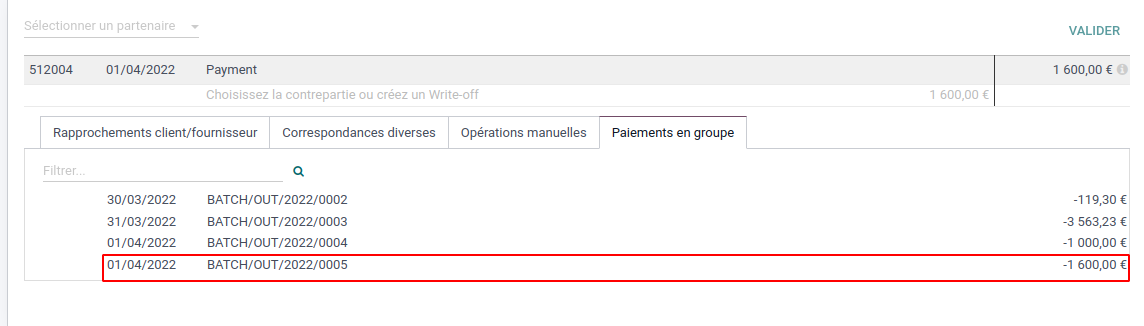
7. When you receive the bank statement in Odoo through bank synchronization, you will be able to reconcile the bank statement with the batch payment.
On the reconciliation view, a new tab will appear containing your batch payment to be reconciled.

Kan du lide at diskutere? Læs ikke bare med, deltag aktivt i debatten!
Opret en konto i dag for at få glæde af eksklusive funktioner, og bliv en del af vores skønne fællesskab!
Tilmeld dig| Relaterede indlæg | Besvarelser | Visninger | Aktivitet | |
|---|---|---|---|---|


|
2
mar. 26
|
5419 | ||

|
1
mar. 26
|
6600 | ||

|
1
aug. 23
|
27226 | ||


|
3
aug. 23
|
6965 | ||

|
2
maj 24
|
9481 |
