Skip to Content
Odoo Menu
  • Log ind
  • Prøv gratis
  • Apps
    Økonomi
    • Bogføring
    • Fakturering
    • Udgifter
    • Regneark (BI)
    • Dokumenter
    • e-Signatur
    Salg
    • CRM
    • Salg
    • POS Butik
    • POS Restaurant
    • Abonnementer
    • Udlejning
    Hjemmeside
    • Hjemmesidebygger
    • e-Handel
    • Blog
    • Forum
    • LiveChat
    • e-Læring
    Forsyningskæde
    • Lagerbeholdning
    • Produktion
    • PLM
    • Indkøb
    • Vedligeholdelse
    • Kvalitet
    HR
    • Medarbejdere
    • Rekruttering
    • Fravær
    • Medarbejdersamtaler
    • Anbefalinger
    • Flåde
    Marketing
    • Markedsføring på sociale medier
    • E-mailmarketing
    • SMS-marketing
    • Arrangementer
    • Automatiseret marketing
    • Spørgeundersøgelser
    Tjenester
    • Projekt
    • Timesedler
    • Udkørende Service
    • Kundeservice
    • Planlægning
    • Aftaler
    Produktivitet
    • Dialog
    • Kunstig intelligens
    • IoT
    • VoIP
    • Vidensdeling
    • WhatsApp
    Tredjepartsapps Odoo Studio Odoo Cloud-platform
  • Brancher
    Detailhandel
    • Boghandel
    • Tøjforretning
    • Møbelforretning
    • Dagligvarebutik
    • Byggemarked
    • Legetøjsforretning
    Mad og værtsskab
    • Bar og pub
    • Restaurant
    • Fastfood
    • Gæstehus
    • Drikkevareforhandler
    • Hotel
    Ejendom
    • Ejendomsmægler
    • Arkitektfirma
    • Byggeri
    • Ejendomsadministration
    • Havearbejde
    • Boligejerforening
    Rådgivning
    • Regnskabsfirma
    • Odoo-partner
    • Marketingbureau
    • Advokatfirma
    • Rekruttering
    • Audit & certificering
    Produktion
    • Tekstil
    • Metal
    • Møbler
    • Fødevareproduktion
    • Bryggeri
    • Firmagave
    Heldbred & Fitness
    • Sportsklub
    • Optiker
    • Fitnesscenter
    • Kosmetolog
    • Apotek
    • Frisør
    Håndværk
    • Handyman
    • IT-hardware og support
    • Solenergisystemer
    • Skomager
    • Rengøringsservicer
    • VVS- og ventilationsservice
    Andet
    • Nonprofitorganisation
    • Miljøagentur
    • Udlejning af billboards
    • Fotografi
    • Cykeludlejning
    • Softwareforhandler
    Gennemse alle brancher
  • Community
    Få mere at vide
    • Tutorials
    • Dokumentation
    • Certificeringer
    • Oplæring
    • Blog
    • Podcast
    Bliv klogere
    • Udannelselsesprogram
    • Scale Up!-forretningsspillet
    • Besøg Odoo
    Få softwaren
    • Download
    • Sammenlign versioner
    • Udgaver
    Samarbejde
    • Github
    • Forum
    • Arrangementer
    • Oversættelser
    • Bliv partner
    • Tjenester til partnere
    • Registrér dit regnskabsfirma
    Modtag tjenester
    • Find en partner
    • Find en bogholder
    • Kontakt en rådgiver
    • Implementeringstjenester
    • Kundereferencer
    • Support
    • Opgraderinger
    Github Youtube Twitter LinkedIn Instagram Facebook Spotify
    +1 (650) 691-3277
    Få en demo
  • Prissætning
  • Hjælp
Du skal være registreret for at interagere med fællesskabet.
Alle bidrag Personer Emblemer
Tags (Vis alle)
odoo course gettingstarted community database
Om dette forum
Du skal være registreret for at interagere med fællesskabet.
Alle bidrag Personer Emblemer
Tags (Vis alle)
odoo course gettingstarted community database
Om dette forum
  1. Getting Started
  2. Forum

2 companies. Need to keep data apart

Tilmeld

Få besked, når der er aktivitet på dette indlæg

Dette spørgsmål er blevet anmeldt
4 Besvarelser
3376 Visninger
Avatar
Vincent Jerome Healy

Hello. I have 2 websites and two companies on odoo. I can't seem to be able to keep the data apart, it's the reason why I bought the second company but it's not working. Example, all the contacts/clients from the first website/company are on the second one. I can't fix it. Any help or ideas would be great. Thanks in advance. Vin

0
Avatar
Kassér
Avatar
S.A. Methsiri Madusanka Sooriyaarachchi
Bedste svar

In Odoo, managing multiple companies and websites while keeping data separate requires proper configuration. Here’s a step-by-step guide to help you ensure that your data remains distinct across both companies and websites:

1. Verify Company Configuration

  1. Check Company Settings:
    • Go to Settings > Companies.
    • Ensure that each company is properly set up and listed here.
  2. Assign Users to Companies:
    • Each user should be assigned to the correct company to ensure data segregation.
    • Go to Settings > Users & Companies > Users and verify each user’s company assignment.

2. Configure Multi-Website Settings

  1. Check Website Configuration:
    • Go to Website > Configuration > Settings.
    • Ensure that you have properly set up multiple websites if applicable.
  2. Website-Specific Settings:
    • Each website should be linked to the correct company. Go to Website > Configuration > Websites and ensure that each website is associated with the correct company.

3. Data Segregation

  1. Enable Multi-Company Access:
    • Ensure that the Multi-Company feature is enabled.
    • Go to Settings > Users & Companies > Companies, and verify that each company has distinct access rights.
  2. Check Contact Records:
    • Ensure that contacts and clients are correctly linked to their respective companies.
    • When creating or editing contacts, check the Company field to ensure it’s assigned to the right company.
  3. Data Filtering:
    • Use domain filters to restrict data views by company. In list views and reports, ensure that you apply filters to view data specific to the current company.

4. Review Website and Sales Configuration

  1. Separate Sales and Contacts:
    • Verify that each company has its own set of sales and contact records.
    • Check that each website is configured to use the appropriate sales team and contact records for its respective company.
  2. Website-Specific Contact Forms:
    • Ensure that contact forms on each website are configured to submit data to the correct company.

5. Permissions and Access Rights

  1. Check User Access Rights:
    • Ensure that users have the correct access rights and are restricted to the data of their assigned company.
  2. Configure Record Rules:
    • Implement record rules to restrict access to records based on the company context.

6. Test and Validate

  1. Test Data Entry:
    • Create sample records for both companies and verify that they appear correctly in the respective websites and company views.
  2. Review Data Segregation:
    • Regularly check data segregation to ensure that no records are unintentionally shared across companies.

Troubleshooting Tips

  • Check for Customizations: If you have custom modules or code, ensure they are not affecting data segregation.
  • Review Logs: Check Odoo logs for any errors related to company and website data handling.

By following these steps, you should be able to ensure that your data remains separate between the two companies and websites. If you continue to encounter issues, consider consulting Odoo support or a professional who can provide tailored assistance based on your specific configuration.

1
Avatar
Kassér
Vincent Jerome Healy
Forfatter

Thanks. Starting this process now. You're very kind. Cheers, Vin

Niyas Raphy (Walnut Software Solutions)

is those the response generated by GPT ?

Avatar
M-Robotics, Inc., Mauricio Montoya
Bedste svar

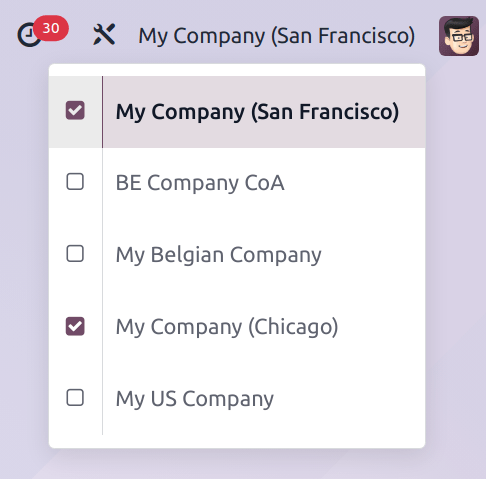
Hello, I hope you already solved your visualization problem but I just wanted to add another check point Methsiri's answer. When you sign in to your account, review you selected companies using the Company Selector in upper right corner (next to your Name). Even when you see only one company name, if you have more than one company enabled then you're going to see shared records in all the applications. Hope this tip helps!
0
Avatar
Kassér
Avatar
Vincent Jerome Healy
Forfatter Bedste svar

Thank you so much for your answer. 

Vin

0
Avatar
Kassér
Avatar
Jasper Hendrickx
Bedste svar

When working in a multi-company set-up, data like contacts can be used in either one of the companies, or in all of the companies, depending on the set-up.

For instance for a partner record, you can select which company this record belongs to using the dropdown in the 'Company' field: "Demo Company" in this example. 
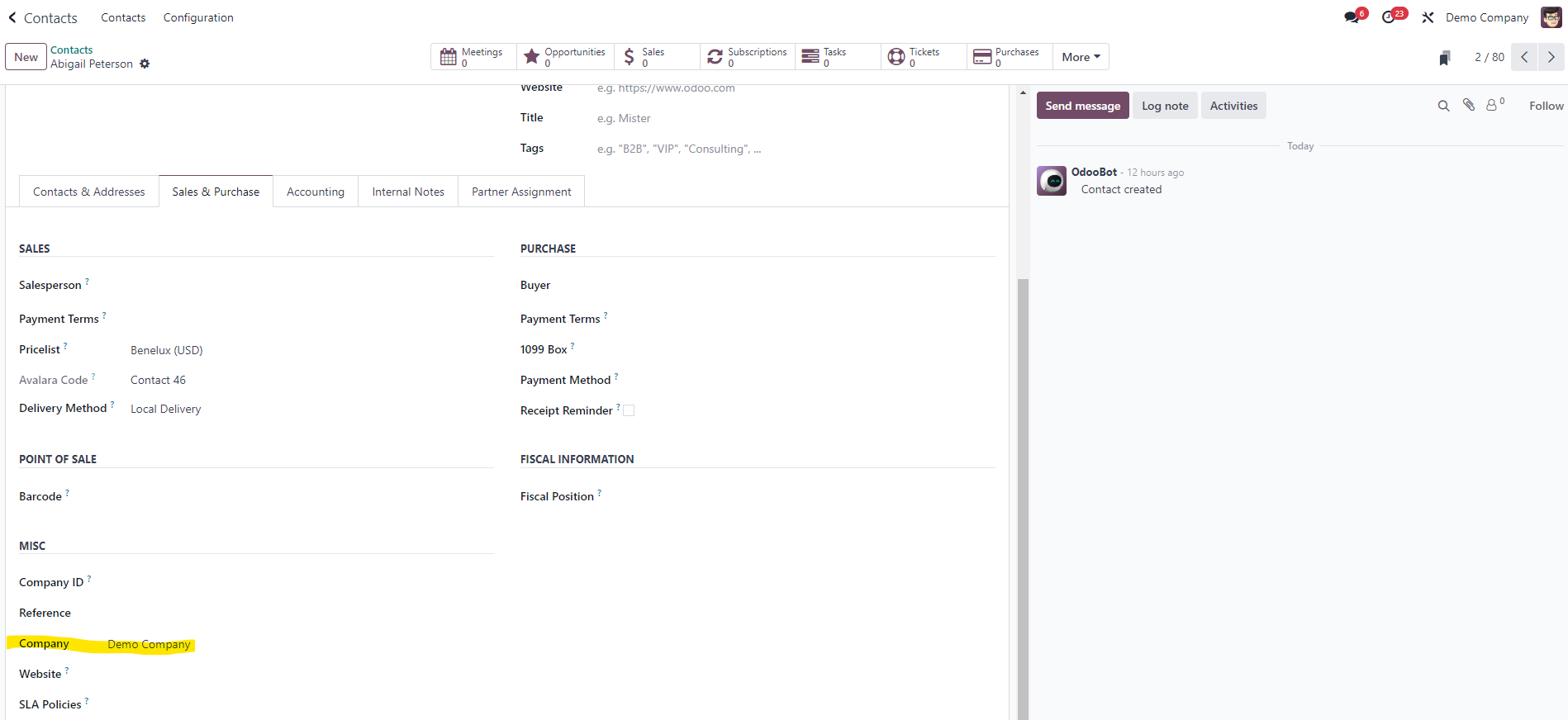


By default, products and contacts are shared between all the companies.

For more information, refer to the Multi-Company documentation: https://www.odoo.com/documentation/17.0/applications/general/multi_company.html

0
Avatar
Kassér
Kan du lide at diskutere? Læs ikke bare med, deltag aktivt i debatten!

Opret en konto i dag for at få glæde af eksklusive funktioner, og bliv en del af vores skønne fællesskab!

Tilmeld dig

Community
  • Tutorials
  • Dokumentation
  • Forum
Open Source
  • Download
  • Github
  • Runbot
  • Oversættelser
Tjenester
  • Odoo.sh-hosting
  • Support
  • Opgradere
  • Individuelt tilpasset udvikling
  • Uddannelse
  • Find en bogholder
  • Find en partner
  • Bliv partner
Om os
  • Vores virksomhed
  • Brandaktiver
  • Kontakt os
  • Stillinger
  • Arrangementer
  • Podcast
  • Blog
  • Kunder
  • Juridiske dokumenter • Privatlivspolitik
  • Sikkerhedspolitik
الْعَرَبيّة Català 简体中文 繁體中文 (台灣) Čeština Dansk Nederlands English Suomi Français Deutsch हिंदी Bahasa Indonesia Italiano 日本語 한국어 (KR) Lietuvių kalba Język polski Português (BR) română русский язык Slovenský jazyk Slovenščina Español (América Latina) Español Svenska ภาษาไทย Türkçe українська Tiếng Việt

Odoo er en samling open source-forretningsapps, der dækker alle dine virksomhedsbehov – lige fra CRM, e-handel og bogføring til lagerstyring, POS, projektledelse og meget mere.

Det unikke ved Odoo er, at systemet både er brugervenligt og fuldt integreret.

Website made with

Odoo Experience on YouTube

1. Use the live chat to ask your questions.
2. The operator answers within a few minutes.

Live support on Youtube
Watch now