

In the interior construction industry, there is a familiar paradox that almost every business has experienced: goods arrive at the warehouse when the site is not ready, or the site needs installation, but the goods have not arrived in time. Two opposing situations, the same root cause: a lack of synchronization between the actual construction progress at the site and the supply chain at the office.
This is not a problem of capability, but a problem of the information system. When construction progress information resides in the site supervisor's head, the purchasing plan is in an Excel file managed by the project department, and the revenue and costs of each project are not clearly visible to anyone, losses are inevitable.
This article analyzes 3 core operational breakdowns, derived from actual surveys, and how each breakdown is completely resolved on the Odoo ERP platform.
The Current Picture: How Are Interior Construction Businesses Operating?
Before diving into each issue, let's look at the typical operational process adopted by most SME interior construction businesses:
Department | Tools Currently Used | Bottleneck |
Sales / Business | Zalo, email, Excel quotes | Quotes are not connected to material planning & progress |
Project Department | Separate progress Excel, periodic meetings | Progress information is not updated in real-time for other departments |
Procurement / Purchasing | Purchasing Excel, Zalo with suppliers | Does not know the exact time materials are needed at the construction site |
Design | AutoCAD, separate files | Drawings are not linked to the material list & purchase orders |
Site Supervision | Phone, Zalo photos | No official system for recording progress & acceptance |
Bottleneck #1: Information Breakdown Between the Office and the Construction Site
Reality: Architect in the office, supervisor on site, two disconnected worlds
In the project-based interior construction process, information moves in a one-way and disjointed flow: the design department updates drawings at the office → sends them via email or Zalo to the supervisor → the supervisor implements them on site → provides feedback via phone. Every design change, every time additional materials are required, must go through this manual communication chain.
Odoo Solution: A single project space, from office to construction site
Odoo Project creates a centralised workspace where all project information is accessible in real-time, whether in the office or on-site:
Hierarchical project structure: Project → Stage → Task → Detailed work. Each level has a responsible person, a deadline, and a separate status.
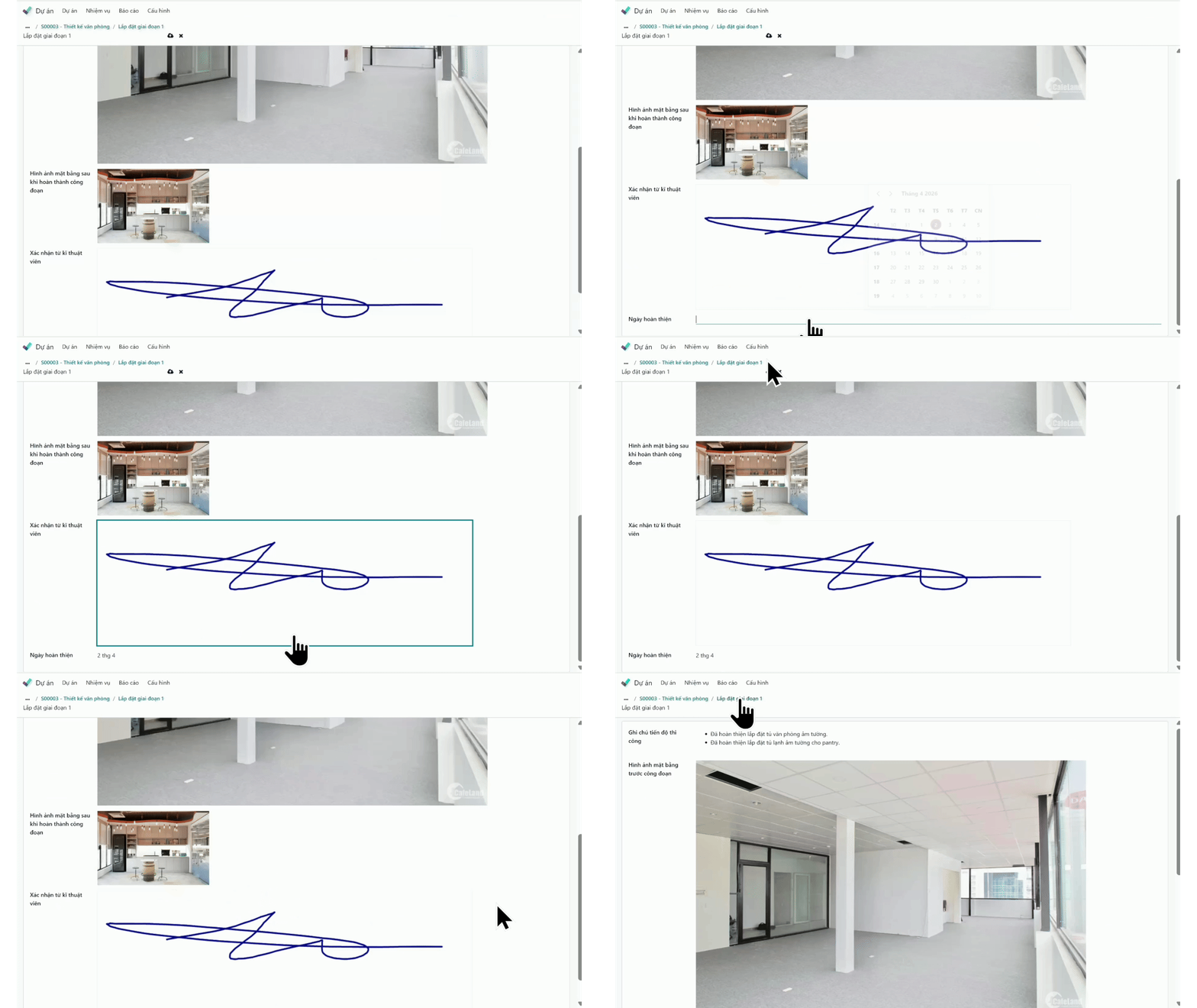
Real-time updates from the site: The supervisor updates progress, attaches actual photos directly on the phone, immediately visible to the project department at the office.
Centralised document linking: Design drawings, meeting minutes, and contracts are directly attached to each project stage, not scattered across emails or Zalo.
Role-based permissions: Architects see design items, supervisors see the list of construction tasks, and management sees the entire progress. Information reaches the right person at the right time.
Bottleneck #2: Goods Arrive at the Warehouse Before Installation or Site Needs Materials That Haven't Arrived
Reality: Lack of connection between the construction schedule and the ordering schedule
This is the most costly bottleneck in interior project operations. Goods arrive early → increased storage costs, risk of damage, crowded workshop. Goods arrive late → construction team has to wait, delayed handover, contract penalties.
Both occur because there is no system to calculate backward from the installation date → date materials are needed on site → date of order from the supplier, based on the actual lead time.
Actual Situation | Root Cause | Consequence |
Kitchen cabinet arrives at the warehouse 3 weeks before the installation date, requiring truck rental to transport back and forth | Ordering based on a fixed schedule, not connected to actual progress | 2 times transportation cost + risk of scratches during movement |
Missing accessories when the team arrives for installation, forcing them to return | No complete material list is linked to each milestone | 1 wasted working day for the construction team, delayed handover |
The foreign supplier delivers goods after 10 weeks, and the site has to wait 2 weeks | Lead time is not calculated backwards when scheduling construction | Workers waiting for work, risk of contract penalties |
Odoo Solution: Purchasing is calculated backwards from the installation date
Odoo integrates the Project + Purchasing modules to plan purchases based on construction milestones:
Step 1: Set up the time milestone with a tentative date. Example: "Install kitchen cabinet on 1st floor" → Date 06/15.
Step 2: Declare supplier Lead Time. Supplier from Italy = 10 weeks → Purchasing department knows they must order before 04/15.
Step 3: The Purchase Order (PO) is tagged with the project code → When retrieving the project's purchasing costs, all related POs are displayed by project, without confusion.
Step 4: Goods receipt against the PO → Warehouse receipt records which PO and which project it belongs to, for future cost reporting.
Before Odoo (Excel + Zalo) | After Odoo |
|
|
Bottleneck #3: Not Knowing Which Project Is Profitable, Which Project Is Losing Money
Reality: Revenue exists, but the actual profit or loss for each construction site is unknown
Interior construction businesses often manage multiple concurrent projects. Each project has its own budget, suppliers, and construction team. But when asked, "Is this project making a profit or a loss?", the typical answer is: "Let me consolidate it from Excel."
The core reason: purchasing costs, labor costs, and installment revenues are located in three different places. Nothing connects them back to each project. As a result, the business owner looks at the bank account to know "if there is money" instead of looking at the data to know "which project is generating profit, and which project is eroding resources".
Situation | Current Reality | Consequence |
Want to know if Project A is making a profit or loss | Must manually compile: purchase invoices + labor costs + revenue from multiple Excel files | Takes 1-2 days to consolidate, data is often wrong due to omissions |
5 projects running concurrently, want to know which one to prioritize | No PNL report by project, decisions based on intuition | Resources are concentrated on a losing project unknowingly |
Customer requests a contract adjustment midway | Does not know the actual costs incurred in negotiating | Accepts unfavorable terms due to lack of data |
End of project, want to know the actual profit | Manual consolidation takes many days, often missing a few small expenses | No basis for accurate pricing for similar projects later |
Odoo Solution: Project + Analytic Accounting, PNL for each project directly on the system
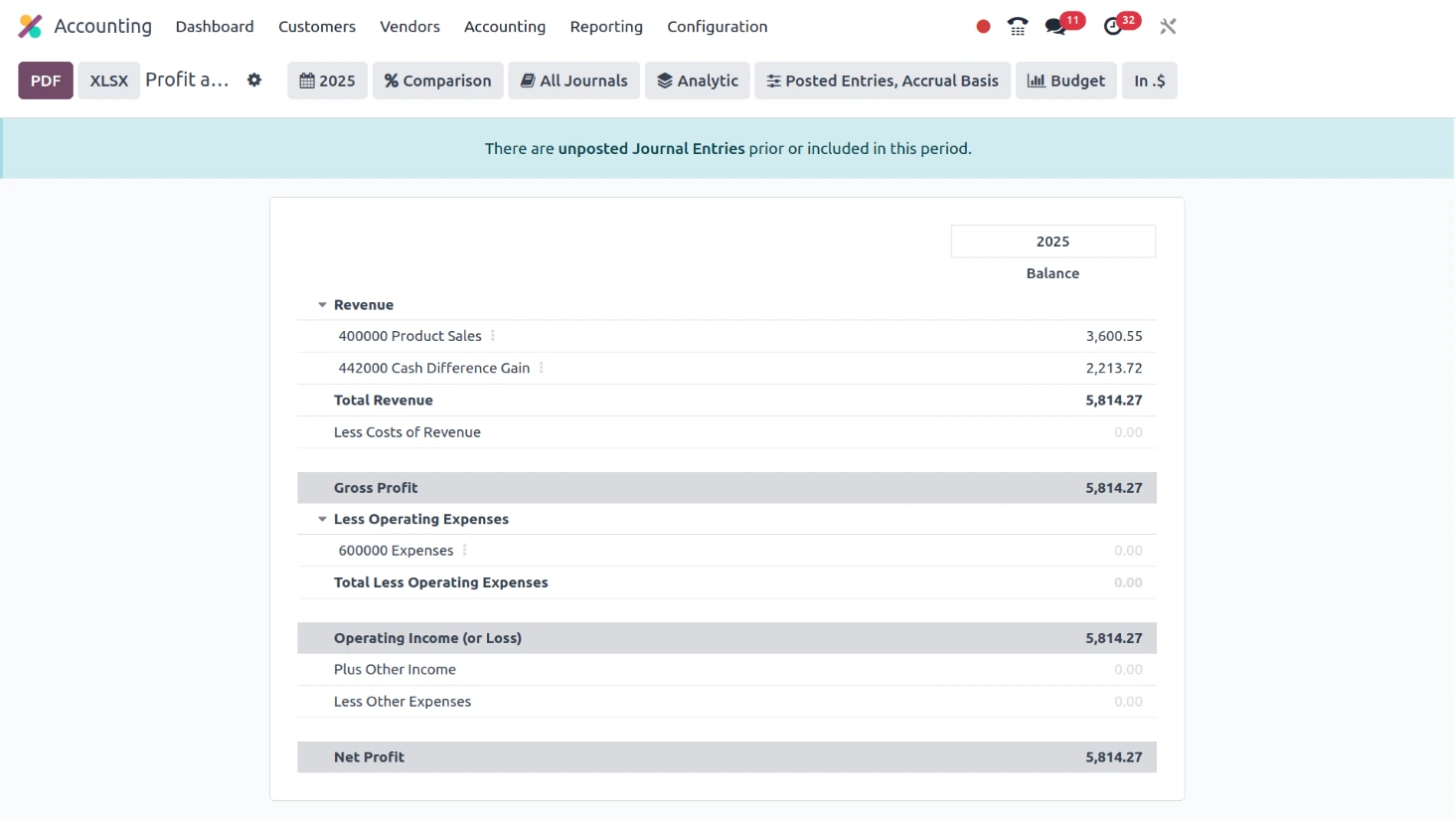
Odoo connects the Project module with Analytic Accounting. All financial transactions related to that project are recorded in this analytic account, including:
Purchasing Costs: Each PO is tagged with the project code → when the supplier issues an invoice, the cost is automatically allocated to the correct project.
Revenue: Invoices issued to customers for each payment installment are also linked to the corresponding project.
PNL Report by Project: Odoo automatically compiles: Total revenue, total costs, actual profit/loss for each project, viewable directly on the system without manual Excel consolidation.
Before Odoo | After Odoo |
|
|
Summary Table: 3 Issues, Solutions, Odoo Modules
# | Issue | Actual Symptoms | Odoo Solution | Module |
1 | Information breakdown between the office and the site | The supervisor and the architect lack common information. Design changes cause confusion and frequent back-and-forth | Centralized project space + real-time updates from the phone | Project + Field Service |
2 | Goods arrive at the wrong time | Crowded warehouse or site waiting for goods. Unable to calculate supplier lead time | Backward calculation of lead time from milestone date → determine order date. PO tagged with project code | Project + Purchasing |
3 | Lack of PNL visibility per project | Does not know which project is profitable or losing money. Requires manual consolidation that takes many days | Analytic Account by project: costs and revenues automatically allocated, view PNL directly on the system | Project + Analytic Accounting |
Frequently Asked Questions
1. How to synchronize construction progress with the purchasing plan?
Use Odoo Project to set up construction milestones with specific expected dates. Based on the lead time of each supplier, the purchasing department calculates backward to determine the required order date. When creating a Purchase Order (PO), tag it with the project code so that all costs are tracked by the construction site.
2. Why do interior construction businesses often not know whether a project is profitable or losing money?
Because purchasing costs, installment revenues, and labor costs are in many different places and are not linked by project. All related POs, purchase invoices, and sales invoices are automatically allocated here, allowing PNL (profit and loss) for each project to be viewed directly on the system without manual consolidation.
3. How to perform interior construction acceptance using software?
Odoo Field Service Management allows site supervisors to take on-site photos, record completed items, and sign digital acceptance minutes directly on their phones. The customer representative signs the confirmation on the spot. The minute is saved in the system and activates the creation of the corresponding payment installment invoice, eliminating the need for the project department to reconfirm progress.
4. Why is Odoo a reliable choice for your interior businesses?
In an industry that demands absolute precision in scheduling, like interior design, Odoo is not just a piece of software, but a proven management ecosystem. In Vietnam, over 10,000 businesses (from SME production workshops to large construction corporations) are operating on the Odoo platform, turning the 16 million global user figure into a commitment to long-term stability.
Specifically, with a 24/7 support team and a dedicated hotline for the APAC region, any operational issues between the office and the site will always be resolved promptly, ensuring your project never has to wait for the system.
Which problem is your project stuck on?
Receive a free consultation, an Odoo Vietnam expert will analyze your actual project process in 45 minutes.
Contact us