
If the user wants a specific header on SO and invoice reports, here is a basic use-case that shows how to customize it.
คำถามนี้ถูกตั้งค่าสถานะ
1
ตอบกลับ
4136
มุมมอง

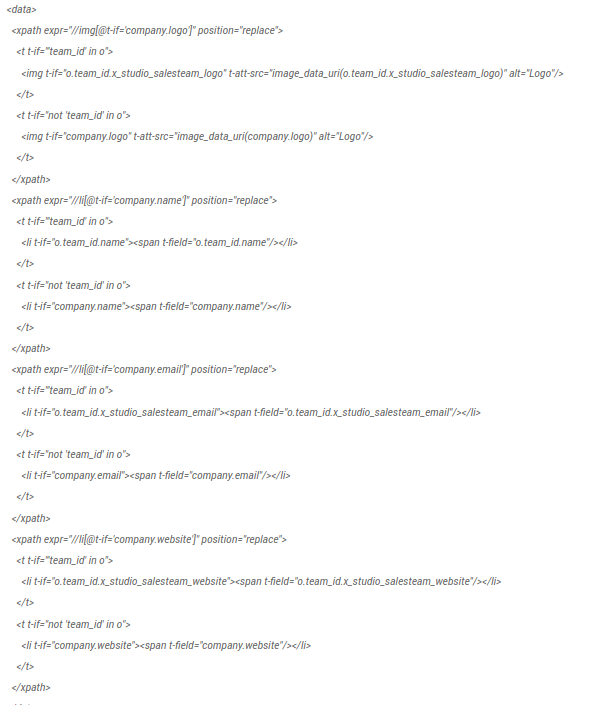
The purpose of the customization is displaying the salesteam information (logo, name, email and website):
Using Odoo Studio, create the needed field on the salesteam.
2. In the General Settings, check which report is used by default.
3. Find the related view.
4. Create an inherited view.
5. Replace the "company" field by your "o.team_id" fields. For example :
สนุกกับการพูดคุยนี้ใช่ไหม? เข้าร่วมเลย!
สร้างบัญชีวันนี้เพื่อเพลิดเพลินไปกับฟีเจอร์พิเศษและมีส่วนร่วมกับคอมมูนิตี้ที่ยอดเยี่ยมของเรา!
ลงชื่อ| Related Posts | ตอบกลับ | มุมมอง | กิจกรรม | |
|---|---|---|---|---|


|
4
ธ.ค. 23
|
5751 | ||


|
2
มี.ค. 20
|
7300 | ||
|
Report editor: Show specific item
แก้ไขแล้ว
|


|
1
มี.ค. 24
|
3751 | |

|
0
ก.พ. 22
|
2006 | ||
|
How to display a report in a url?
แก้ไขแล้ว
|
|
1
ก.ค. 21
|
6561 |
