Hoppa till innehåll
Odoo Meny
  • Logga in
  • Prova gratis
  • Appar
    Ekonomi
    • Bokföring
    • Fakturering
    • Utgifter
    • Kalkylark (Affärsanalyser)
    • Dokument
    • Underskrifter
    Försäljning
    • CRM
    • Försäljning
    • Kassasystem Butik
    • Kassasystem Restaurang
    • Prenumerationer
    • Uthyrning
    Hemsida
    • Hemsidesverktyg
    • E-handel
    • Blogg
    • Forum
    • Livechatt
    • Utbildning
    Försörjningskedja
    • Lager
    • Produktion
    • Produktens livscykel (PLM)
    • Inköp
    • Underhåll
    • Kvalitet
    HR
    • Anställda
    • Rekrytering
    • Ledighet
    • Utvärderingar
    • Rekommendationer
    • Fordon
    Marknadsföring
    • Sociala medier
    • E-postmarknadsföring
    • Sms-marknadsföring
    • Evenemang
    • Automatiserad marknadsföring
    • Enkäter
    Tjänster
    • Projekt
    • Tidrapporter
    • Fältservice
    • Kundtjänst
    • Planering
    • Tidsbokningar
    Produktivitet
    • Diskutera
    • AI
    • IoT
    • VoIP
    • Kunskap
    • WhatsApp
    Community-appar Odoo Studio Odoo Cloud
  • Branscher
    Butiker
    • Bokaffärer
    • Klädbutiker
    • Möbelaffärer
    • Mataffärer
    • Byggvaruhus
    • Leksaksaffärer
    Restaurang & Hotell
    • Barer och pubar
    • Restauranger
    • Snabbmatsrestauranger
    • Gästhus
    • Dryckesdistributörer
    • Hotell
    Fastigheter
    • Fastighetsbyråer
    • Arkitektfirmor
    • Byggföretag
    • Fastighetsägare
    • Trädgårdsmästare
    • Bostadsrättsföreningar
    Hitta en konsult
    • Redovisningsbyrå
    • Odoo Partner
    • Reklambyråer
    • Advokatbyråer
    • Rekrytering
    • Revisioner och certifieringar
    Produktion
    • Textilproduktion
    • Metallproduktion
    • Möbelproduktion
    • Livsmedelsproduktion
    • Bryggerier
    • Företagsgåvor
    Hälsa och fitness
    • Sportklubbar
    • Optiker
    • Träningscenter
    • Friskvård
    • Apotek
    • Frisörsalonger
    Hantverk
    • Hantverkare
    • IT-utrustning och kundtjänst
    • Solceller, solpaneler och solenergi
    • Skomakare
    • Städföretag
    • VVS-tjänster
    Övrigt
    • Ideella föreningar
    • Miljöförvaltningar
    • Uthyrning av reklamtavlor
    • Fotografer
    • Cykeluthyrning
    • Återförsäljare av mjukvara
    Upptäck alla Branscher
  • Community
    Utbildning
    • Instruktionsvideor
    • Dokumentation
    • Certifiering
    • Utbildningar
    • Blogg
    • Podcast
    Lär dig med oss
    • Workshops
    • Företagsspelet Scale Up!
    • Studiebesök hos Odoo
    Mjukvaran
    • Ladda ner
    • Jämför utgåvor
    • Versionsinformation
    Samverkan
    • GitHub
    • Forum
    • Evenemang
    • Översättningar
    • Bli en partner
    • Partnertjänster
    • Registrera din redovisningsbyrå
    Våra tjänster
    • Partners
    • Revisorer
    • Träffa en rådgivare
    • Implementering
    • Kundrecensioner
    • Kundtjänst
    • Uppgraderingar
    GitHub Youtube Twitter Linkedin Instagram Facebook Spotify
    +1 (650) 691-3277
    Boka en demo
  • Priser
  • Hjälp
Du måste vara registrerad för att kunna interagera med communityn.
Alla inlägg Personer Utmärkelser
Etiketter (Visa alla)
odoo accounting v14 pos v15
Om detta forum
Du måste vara registrerad för att kunna interagera med communityn.
Alla inlägg Personer Utmärkelser
Etiketter (Visa alla)
odoo accounting v14 pos v15
Om detta forum
Hjälp

Make "Lost Reason" a required field

Prenumerera

Få ett meddelande när det finns aktivitet på detta inlägg

Denna fråga har flaggats
crmOdoo18.0
3 Svar
2817 Vyer
Avatar
Hannes Winkler

I am using Odoo.sh in version 18.0, how can I modify the lost reason field in the crm module in a way, that it is required to fill before a user can mark the lead/opportunity as lost? 

I tried to change it with activated developer mode by going to the field options and ticking the box for "required" as shown in the picture below, but when I try to save the changes it says that I can not change it like this, I would need to change it with some python code preferably with an own module. Is that really necessary? It seeems that needing to make a own module in order to be able to make such a small change to the user experience feels like a bit over the top. 

Is there any faster/easier way to do this?

Thanks in advance. 

0
Avatar
Avbryt
Ray Carnes (ray)

Every time I have made optional things required in Odoo I end up with "." or some other entry that means "I don't know" or "I am just putting something there because it forces me to" - so be prepared for that.

Ard van Someren

The remark of Ray is true. It is difficult to ask users to add some valid reason to a required field. And the select box does categorize the reason already. So managing the list of reasons is probably the better way to go.

Avatar
Cybrosys Techno Solutions Pvt.Ltd
Bästa svar

Hi,

1. From UI


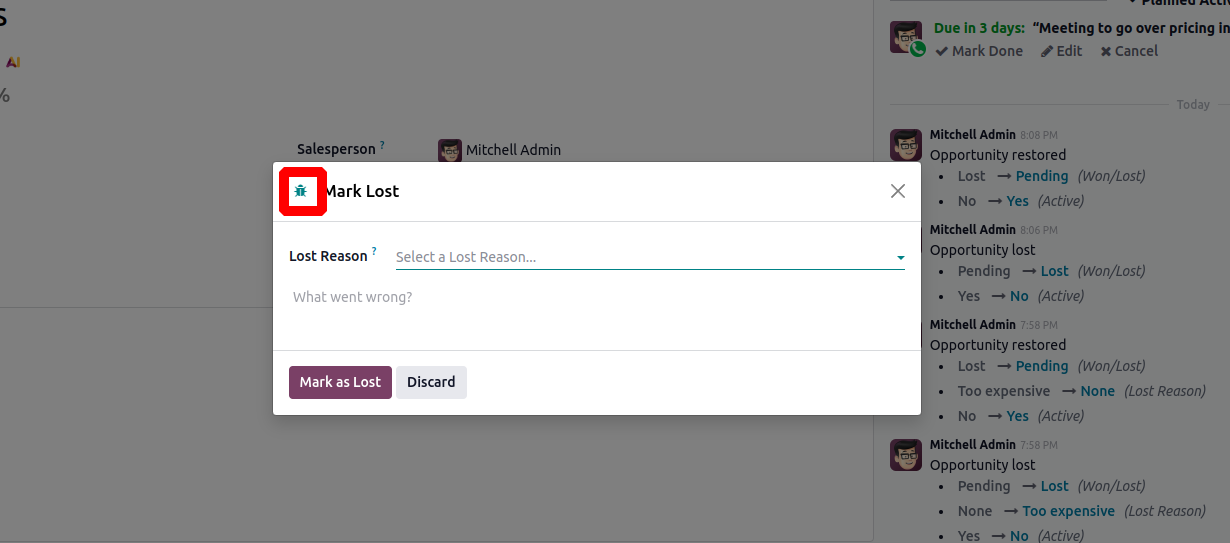
When you enable Developer Mode in Odoo, you’ll see the bug icon, often referred to as the superuser or debug icon, appear in the top-left corner of forms and pop-ups.


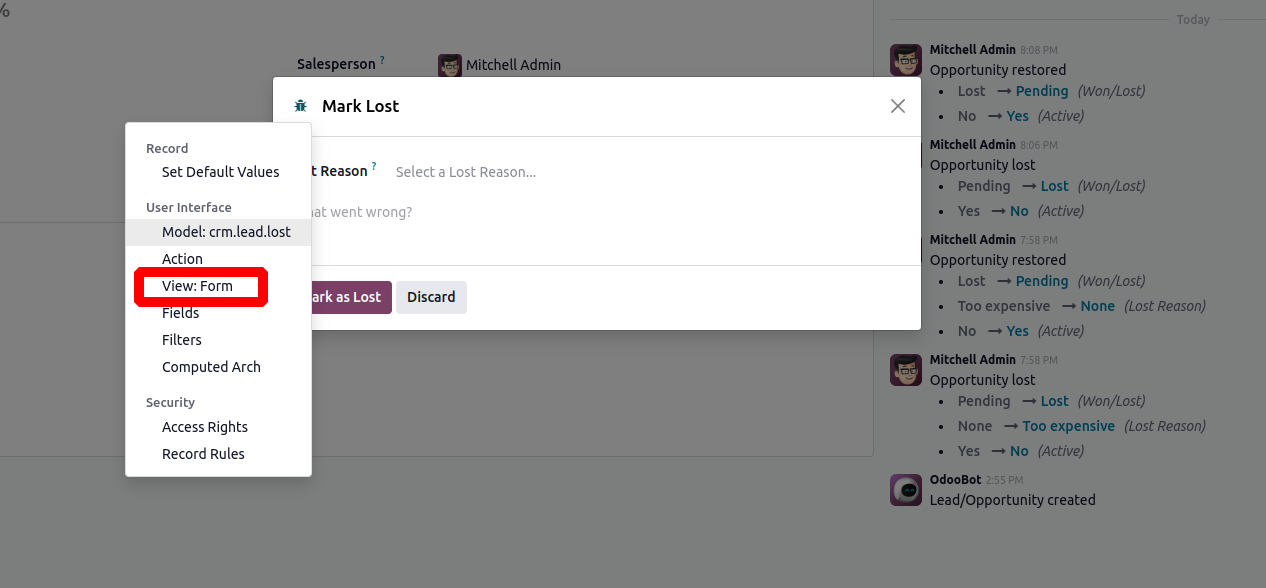
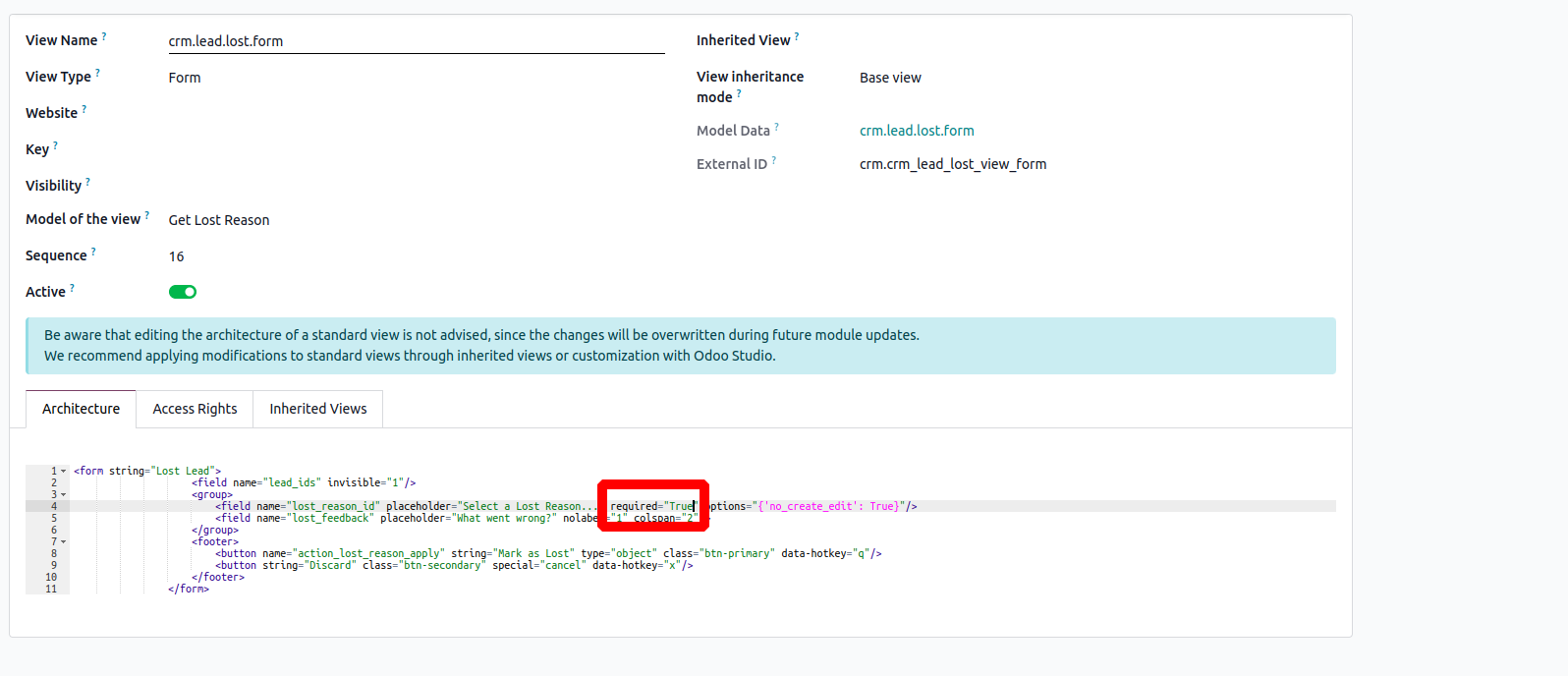
Clicking this icon allows you to access technical tools. For example, if you click the superuser (bug) icon and then select "View: Form", Odoo will open the XML definition of the form view currently being displayed.


Add attribute required="True" to the field lost_reason_id


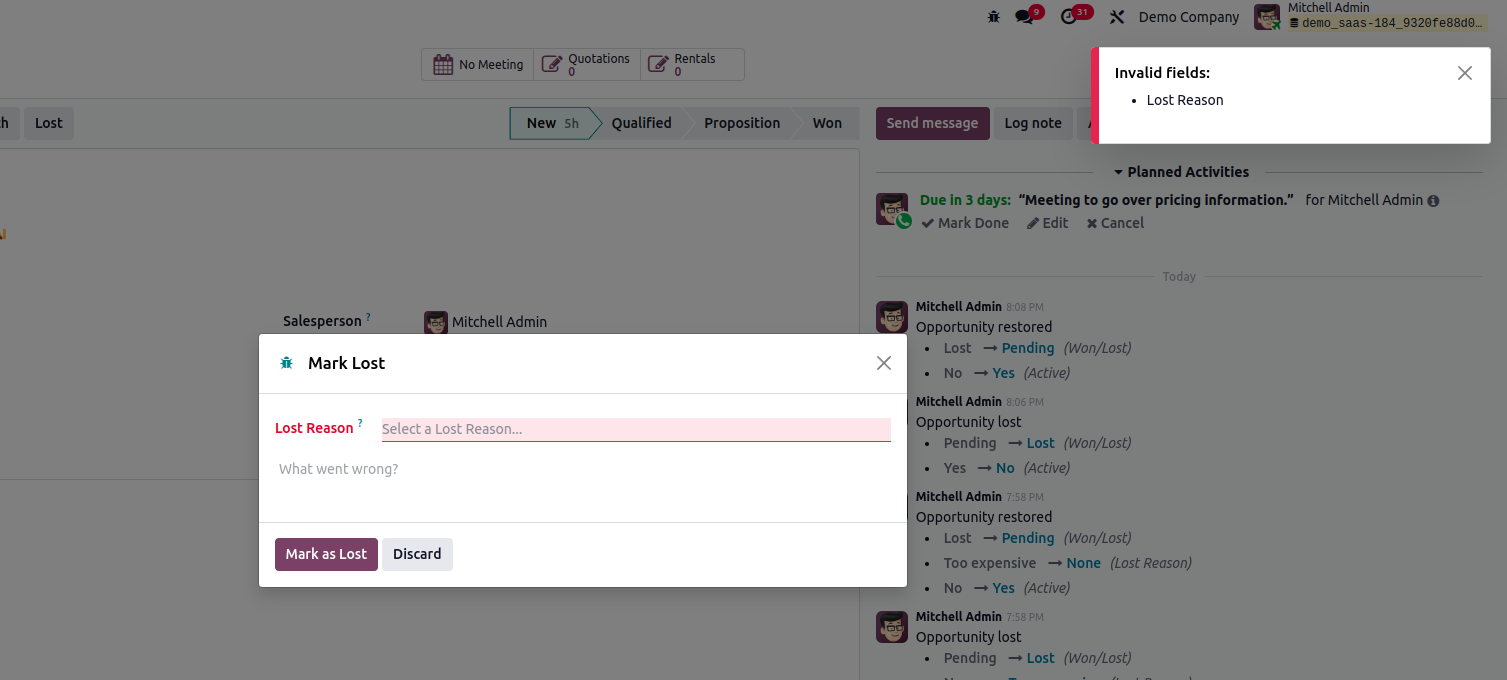
Then save the record. You can see that lost reason is mandatory before marking it as lost


2. By using Code


<record id="crm_lead_lost_view_form" model="ir.ui.view">

    <field name="name">crm.lead.lost.form</field>

    <field name="model">crm.lead.lost</field>

    <field name="inherit_id"

           ref="crm.crm_lead_lost_view_form"/>

    <field name="arch" type="xml">

          <xpath expr="//field[@name='lost_reason_id']" position="attributes">

            <attribute name="required">1</attribute>

        </xpath>

    </field>

</record>


Hope it helps.

0
Avatar
Avbryt
Avatar
Hannes Winkler
Författare Bästa svar

How am I able to modify that form with the Studio? If I open the crm module in the Studio I am only able to modify the standard view, not the window which opens after I click on "Lost". That form is not visible in Studio?

EDIT:
I managed to do it now with a inherited view, so I didn't have to change anything in the original form. I inherited the crm.lead.lost.form, copied the xml of that form and added <xpath expr="//form" position="replace"> in front of it, then I could add the parameter required="1" to the field. This works fine for me.

0
Avatar
Avbryt
Avatar
Ard van Someren
Bästa svar

The best way is probably with the Studio.

  • Open the form with studio.
  • Select the field or checkbox
  • Set the property required

Hope this helps


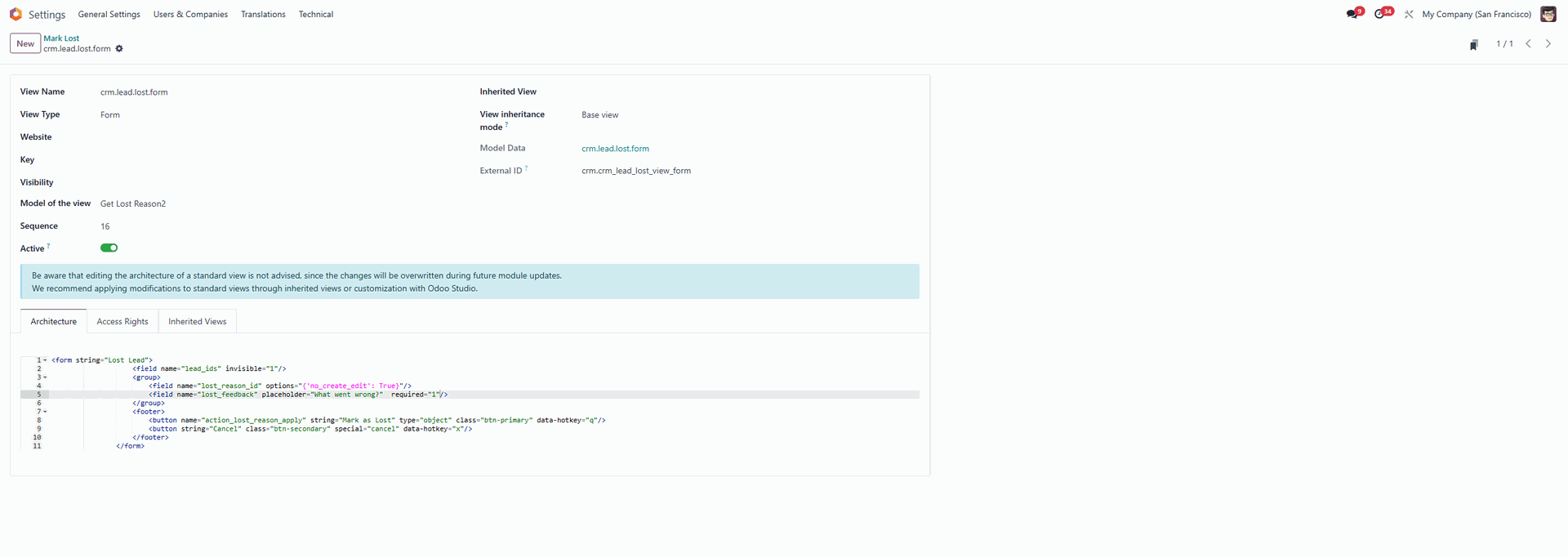
Ah this makes it a bit more complex maybe. But you can change the XML in the crm.lead.lost.form (line 5).


You can get there by go to:

  • Settings
  • Technical | Actions | Window actions
  • Search Mark Lost
  • Open the Window Action
  • Open the view ref (arrow to the right)

Add required="1" to the line and safe


You probably want to change some things to the message too.


0
Avatar
Avbryt
Njuter du av diskussionen? Läs inte bara, delta också!

Skapa ett konto idag för att ta del av exklusiva funktioner och engagera dig i vår fantastiska community!

Registrera dig
Relaterade inlägg Svar Vyer Verksamhet
How can I filter CRM opportunities by completed ("Done") activities in Odoo? Löst
crm
Avatar
Avatar
Avatar
Avatar
3
maj 26
1102
Has anyone integrated Respond.io (or similar) with Odoo for automated messaging via WhatsApp/Instagram tied to CRM/ERP?
crm
Avatar
0
feb. 26
1732
Database Migration Issues in Odoo 18
Odoo18.0
Avatar
Avatar
1
dec. 25
2122
Only the department manager can modify their team members' information.
Odoo18.0
Avatar
Avatar
1
nov. 25
1537
Comment activer notification pour odoo CRM
crm
Avatar
Avatar
Avatar
2
aug. 25
2772
Community
  • Instruktionsvideor
  • Dokumentation
  • Forum
Öppen källkod
  • Ladda ner
  • GitHub
  • Runbot
  • Översättningar
Tjänster
  • Odoo.sh Hosting
  • Kundtjänst
  • Uppgradera
  • Anpassningsbara modifikationer
  • Utbildning
  • Revisorer
  • Partners
  • Bli en partner
Om oss
  • Vårt företag
  • Varumärkestillgångar
  • Kontakta oss
  • Jobb
  • Evenemang
  • Podcast
  • Blogg
  • Kunder
  • Juridiskt • Integritet
  • Säkerhet
الْعَرَبيّة Català 简体中文 繁體中文 (台灣) Čeština Dansk Nederlands English Suomi Français Deutsch हिंदी Bahasa Indonesia Italiano 日本語 한국어 (KR) Lietuvių kalba Język polski Português (BR) română русский язык Slovenský jazyk Slovenščina Español (América Latina) Español Svenska ภาษาไทย Türkçe українська Tiếng Việt

Odoo är ett affärssystem med öppen källkod som täcker alla dina företagsbehov: CRM, e-handel, bokföring, lager, kassasystem, projektledning, och så vidare.

Odoos unika värdeförslag är att samtidigt vara väldigt enkel att använda men också helt integrerad.

Website made with

Odoo Experience on YouTube

1. Use the live chat to ask your questions.
2. The operator answers within a few minutes.

Live support on Youtube
Watch now