Overslaan naar inhoud
Odoo Menu
  • Aanmelden
  • Probeer het gratis
  • Apps
    Financiën
    • Boekhouding
    • Facturatie
    • Onkosten
    • Spreadsheet (BI)
    • Documenten
    • Ondertekenen
    Verkoop
    • CRM
    • Verkoop
    • Kassasysteem winkel
    • Kassasysteem Restaurant
    • Abonnementen
    • Verhuur
    Websites
    • Websitebouwer
    • E-commerce
    • Blog
    • Forum
    • Live Chat
    • E-learning
    Bevoorradingsketen
    • Voorraad
    • Productie
    • PLM
    • Inkoop
    • Onderhoud
    • Kwaliteit
    Personeelsbeheer
    • Werknemers
    • Werving & Selectie
    • Verlof
    • Evaluaties
    • Aanbevelingen
    • Wagenpark
    Marketing
    • Sociale media-marketing
    • E-mailmarketing
    • Sms-marketing
    • Evenementen
    • Marketingautomatisering
    • Enquêtes
    Diensten
    • Project
    • Urenstaten
    • Buitendienst
    • Helpdesk
    • Planning
    • Afspraken
    Productiviteit
    • Chat
    • Artificiële Intelligentie
    • IoT
    • VoIP
    • Kennis
    • WhatsApp
    Apps van derden Odoo Studio Odoo Cloud Platform
  • Bedrijfstakken
    Detailhandel
    • Boekhandel
    • kledingwinkel
    • Meubelwinkel
    • Supermarkt
    • Bouwmarkt
    • Speelgoedwinkel
    Horeca & Hospitality
    • Bar en café
    • Restaurant
    • Fastfood
    • Gastenverblijf
    • Drankenhandelaar
    • Hotel
    Vastgoed
    • Makelaarskantoor
    • Architectenbureau
    • Bouw
    • Vastgoedbeheer
    • Tuinieren
    • Vereniging van mede-eigenaren
    Consulting
    • Accountantskantoor
    • Odoo Partner
    • Marketingbureau
    • Advocatenkantoor
    • Talentenwerving
    • Audit & Certificering
    Productie
    • Textiel
    • Metaal
    • Meubels
    • Eten
    • Brouwerij
    • Relatiegeschenken
    Gezondheid & Fitness
    • Sportclub
    • Opticien
    • Fitnesscentrum
    • Wellness-medewerkers
    • Apotheek
    • Kapper
    Diensten
    • Klusjesman
    • IT-hardware & ondersteuning
    • Zonne-energiesystemen
    • Schoenmaker
    • Schoonmaakdiensten
    • HVAC-diensten
    Andere
    • Non-profitorganisatie
    • Milieuagentschap
    • Verhuur van Billboards
    • Fotograaf
    • Fietsleasing
    • Softwareverkoper
    Alle bedrijfstakken bekijken
  • Community
    Leren
    • Tutorials
    • Documentatie
    • Certificeringen
    • Training
    • Blog
    • Podcast
    Versterk het onderwijs
    • Onderwijsprogramma
    • Scale Up! Business Game
    • Odoo bezoeken
    Download de Software
    • Downloaden
    • Vergelijk edities
    • Releases
    Werk samen
    • Github
    • Forum
    • Evenementen
    • Vertalingen
    • Partner worden
    • Diensten voor partners
    • Registreer je accountantskantoor
    Diensten
    • Vind een partner
    • Vind een boekhouder
    • Een adviseur ontmoeten
    • Implementatiediensten
    • Klantreferenties
    • Ondersteuning
    • Upgrades
    Github Youtube Twitter Linkedin Instagram Facebook Spotify
    +1 (650) 691-3277
    Vraag een demo aan
  • Prijzen
  • Help
Je moet geregistreerd zijn om te kunnen communiceren met de community.
Alle posts Personen Badges
Labels (Bekijk alle)
odoo accounting v14 pos v15
Over dit forum
Je moet geregistreerd zijn om te kunnen communiceren met de community.
Alle posts Personen Badges
Labels (Bekijk alle)
odoo accounting v14 pos v15
Over dit forum
Help

Odoo 18.1 UoM & Packagings

Inschrijven

Ontvang een bericht wanneer er activiteit is op deze post

Deze vraag is gerapporteerd
inventorybarcodeuompackagings
2 Antwoorden
4615 Weergaven
Avatar
Iasonas Polydoros

In the current setup (Odoo 18.0), when a factory produces, for example, a chocolate bar, it's typically packed into boxes of 40 units and then placed on pallets of 120 boxes (4,800 units in total). We manage this with Packagings, where each packaging type has its own barcode and is linked under the same product.


However, after creating a new online version (18.1), I noticed that UoMs and Packagings seem to have been merged, and packaging no longer supports barcodes. How can we simulate the example above in the new version? Would this require creating separate products for each packaging type? If so, how can we efficiently manage scenarios where we need to open a pallet or box to sell smaller quantities, given that they would now be treated as separate products in the database?


Additionally, how will this change be handled during an upgrade? Will the system automatically create new products for each packaging type, or will it require manual intervention?


Finally, this scenario would be better managed using Packages instead of Packagings? If so, how that approach would work? Please note that all products are identified with GS1 barcodes, including lot numbers and expiration dates.

0
Avatar
Annuleer
Hubert Guillemain

@ray in order to manage 3 packagings (pcb, box, pallet) for a single product, each with its own barcode, does it mean that we now have to create 3 UoM, each linked to one of 3 packages, each linked to one of 3 barcodes?

Nedal Alaffouri

The barcode topic needs more development. What is the idea behind not being able to add more than one barcode for each product, while this is possible for each package?

If we need to create more than one barcode for one product, do we have to create a dummy package and then enter all the barcodes for that package?

Alden Bronkhorst

I so agree with this. The new way of managing packaging is very bad compared to 18.0.


Why is packaging only under the Sales tabs? It is used on the Purchasing side just as much!

Sakesun Roykiattisak

This is weird. Who would have thought alternative uoms will be in "UPSELL & CROSS-SELL"

Avatar
Ray Carnes (ray)
Beste antwoord

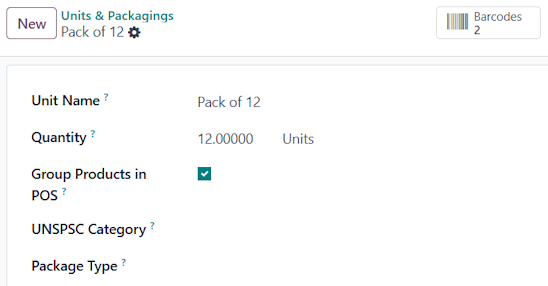
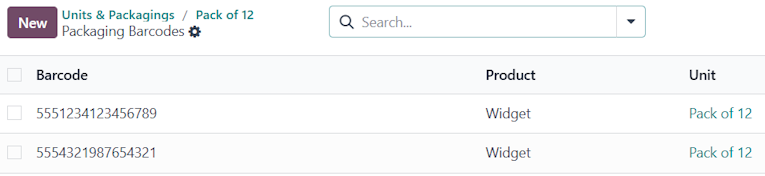
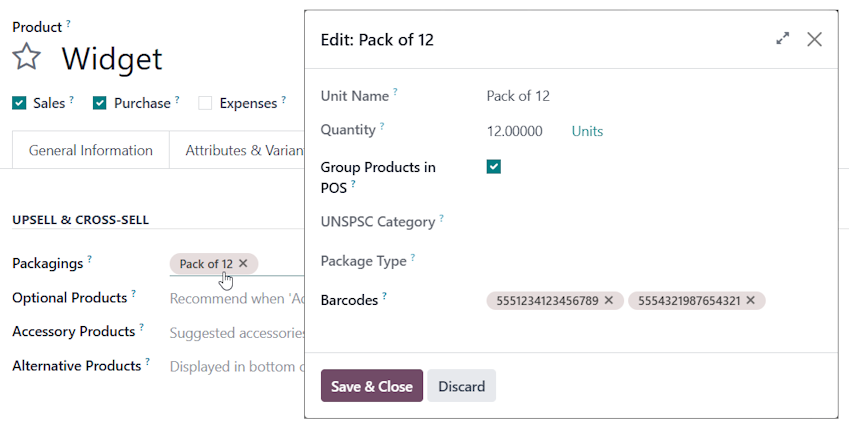
Click the Packaging once you have assigned it to one or more products, where you will be able to associate it with one or more barcodes.


You will then see a Smart button at the top of the Packaging record when you open it via Inventory --> Configuration -->Products --> Units & Packagings


1
Avatar
Annuleer
Avatar
Cybrosys Techno Solutions Pvt.Ltd
Beste antwoord

Hi,

Please refer to the following links:

1. https://www.odoo.com/documentation/18.0/applications/inventory_and_mrp/inventory/product_management/configure/uom.html

2. https://www.odoo.com/documentation/18.0/applications/inventory_and_mrp/inventory/product_management/configure/packaging.html

3. https://www.odoo.com/documentation/14.0/applications/inventory_and_mrp/inventory/management/products/usage.html


Hope it helps

-1
Avatar
Annuleer
Geniet je van het gesprek? Blijf niet alleen lezen, doe ook mee!

Maak vandaag nog een account aan om te profiteren van exclusieve functies en deel uit te maken van onze geweldige community!

Aanmelden
Gerelateerde posts Antwoorden Weergaven Activiteit
Use USB Barcode Scanner to update inventory on each product (Odoo 16 Community)
inventory barcode
Avatar
Avatar
1
jun. 25
3378
Odoo Barcode : Split product Lines
inventory barcode
Avatar
0
feb. 23
3384
Is the Zebra ZT410 Supported in Odoo 13
inventory barcode
Avatar
0
jul. 21
3502
Help with UoM and product_second_uom
inventory uom
Avatar
Avatar
1
mrt. 15
8009
How to scan barcode out / in
barcodescanner inventory barcode
Avatar
Avatar
Avatar
3
mei 25
5651
Community
  • Tutorials
  • Documentatie
  • Forum
Open Source
  • Downloaden
  • Github
  • Runbot
  • Vertalingen
Diensten
  • Odoo.sh Hosting
  • Ondersteuning
  • Upgrade
  • Gepersonaliseerde ontwikkelingen
  • Onderwijs
  • Vind een boekhouder
  • Vind een partner
  • Partner worden
Over ons
  • Ons bedrijf
  • Merkelementen
  • Neem contact met ons op
  • Vacatures
  • Evenementen
  • Podcast
  • Blog
  • Klanten
  • Juridisch • Privacy
  • Beveiliging
الْعَرَبيّة Català 简体中文 繁體中文 (台灣) Čeština Dansk Nederlands English Suomi Français Deutsch हिंदी Bahasa Indonesia Italiano 日本語 한국어 (KR) Lietuvių kalba Język polski Português (BR) română русский язык Slovenský jazyk Slovenščina Español (América Latina) Español Svenska ภาษาไทย Türkçe українська Tiếng Việt

Odoo is een suite van open source zakelijke apps die aan al je bedrijfsbehoeften voldoet: CRM, E-commerce, boekhouding, inventaris, kassasysteem, projectbeheer, enz.

Odoo's unieke waardepropositie is om tegelijkertijd zeer gebruiksvriendelijk en volledig geïntegreerd te zijn.

Website made with

Odoo Experience on YouTube

1. Use the live chat to ask your questions.
2. The operator answers within a few minutes.

Live support on Youtube
Watch now