How can I make the error message to display to enable me understad the problem?
Thanks in advance!
Deze vraag is gerapporteerd
Hi,
When Odoo import/export spins and stops without showing a red error or warning, it is usually due to server-side limits or timeouts, not a UI problem. In such cases, Odoo may silently hit CPU, real-time, or request size limits, especially on Linux servers or when using domain filters. To surface the issue, first check the Odoo server logs and PostgreSQL logs, as errors are often logged there even if the UI shows nothing. Increasing the limits in odoo.conf (such as limit_time_cpu, limit_time_real, and limit_request) and restarting the service often resolves this. It also helps to reduce the batch size by importing fewer records at a time to identify problematic rows. Once limits are adjusted or the faulty record is isolated, the import/export process will show proper errors or complete successfully.
Hope it helps
limit_time_cpu = 1200
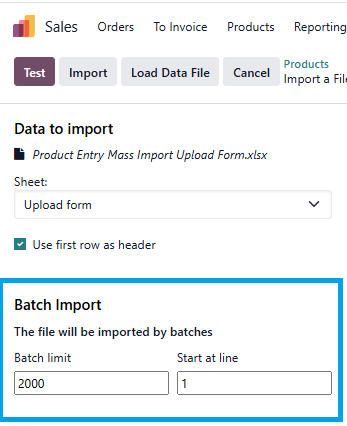
Sometimes it can help to reduce the batch size and see what happens with just a few records:

I know this
Check the log file.
If you don't see an error in the web client it could be timing out.
No error in the log file
Geniet je van het gesprek? Blijf niet alleen lezen, doe ook mee!
Maak vandaag nog een account aan om te profiteren van exclusieve functies en deel uit te maken van onze geweldige community!
Aanmelden| Gerelateerde posts | Antwoorden | Weergaven | Activiteit | |
|---|---|---|---|---|
|
|
2
mei 24
|
4825 | ||
|
|
2
nov. 24
|
3973 | ||
|
|
1
nov. 24
|
4955 | ||
|
|
1
okt. 23
|
5956 | ||
|
|
3
dec. 23
|
23760 |