
How can we connect the Amazon connector to a odoo 17 community edition without upgrading the odoo instance. this is for testing purpose before purchasing the connector
Deze vraag is gerapporteerd
3
Antwoorden
1803
Weergaven


In all cases, where there is just an Upgrade button available for an App, this means that this feature is not part of the Odoo Community Edition:
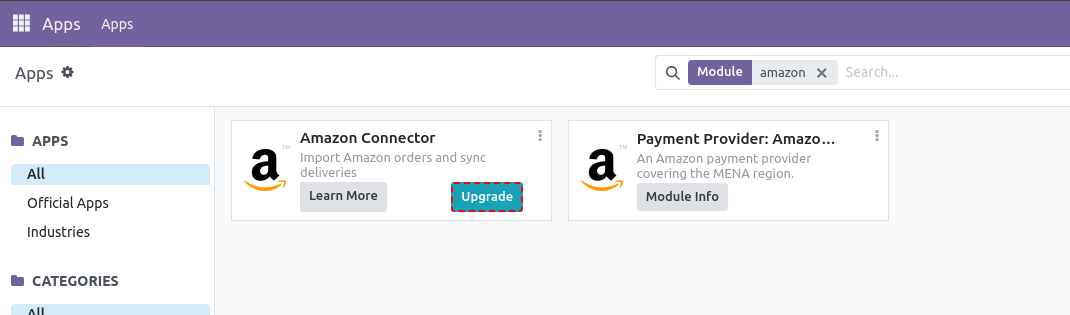
Therefore, Upgrade here means an upgrade from Odoo Community to Odoo Enterprise is necessary, if you wish to use this feature (and many others). You can't choose to just buy a single App from the Odoo Enterprise App-set and use it in your Community Edition.
However, you could run a 15 days free trial instance of Odoo Enterprise Online (Odoo 18 only!) here: https://www.odoo.com/trial
Alternatively you may go for Amazon connectors provided by the community. Whether or not these vendors provide trials, showcases, demos etc. is completely up to them.

Hi Cain,
You've already hit the core issue: Odoo's *native* Amazon connector ships only with Enterprise, so you can't enable it on Community no matter what. The 15-day Enterprise trial lets you see the native one, but it won't help you test on your actual Community instance.
The practical path for testing on Odoo 17 Community is a third-party (community-installable) Amazon connector. Those install as a normal module/app on Community, so you can run them on your existing instance and evaluate the real flow (order import, FBA/FBM stock, returns) before committing.
When you test any of them, two things worth checking up front:
- That it imports orders by SKU mapping cleanly (auto-create vs. fail on unknown SKUs).
- That FBA inventory pulls into a dedicated Amazon location and not your main warehouse.
Full disclosure: I build the FlexiGoTech Amazon Connector, which is exactly this kind of community-installable module for Odoo 17 (also 18/19). Since you specifically want to test before purchasing, I'm happy to just give you a free copy to install on your Odoo 17 Community instance and evaluate, in exchange for an honest review afterwards. No pressure, send me a message if that's useful.

Hi,
Please refer to the following links:
1. https://www.odoo.com/documentation/18.0/applications/sales/sales/amazon_connector.html
2. https://www.odoo.com/sl_SI/app/amazon-connector
3. https://www.odoo.com/documentation/18.0/applications/sales/sales/amazon_connector/setup.html
4. https://www.odoo.com/documentation/18.0/applications/sales/sales/amazon_connector/features.html
Hope it helps.
Geniet je van het gesprek? Blijf niet alleen lezen, doe ook mee!
Maak vandaag nog een account aan om te profiteren van exclusieve functies en deel uit te maken van onze geweldige community!
Aanmelden| Gerelateerde posts | Antwoorden | Weergaven | Activiteit | |
|---|---|---|---|---|

|
2
aug. 25
|
2055 | ||

|
0
nov. 24
|
1989 | ||


|
1
jun. 23
|
4183 | ||

|
0
mei 23
|
2683 | ||


|
1
nov. 22
|
3518 |

The only option I have on the app is to upgrade, the links provided I have seen and I don't have any of the information shown on the links sent because the only option given to me on the app is upgrade, I would attach a screenshot but it wont allow me to says I need 20 karma...