Skip to Content
Odoo मेन्यू
  • साइन इन करें
  • मुफ़्त में आज़माएं
  • ऐप्लिकेशन
    फ़ाइनेंस
    • अकाउंटिंग
    • इनवॉइसिंग
    • एक्सपेंस
    • स्प्रेडशीट (बीआई)
    • डॉक्यूमेंट्स
    • साइन
    सेल्स
    • सीआरएम
    • सेल्स
    • पीओएस शॉप
    • पीओएस रेस्टोरेंट
    • सब्सक्रिप्शन
    • रेंटल
    वेबसाइट
    • वेबसाइट बिल्डर
    • ई-कॉमर्स
    • ब्लॉग
    • फ़ोरम
    • लाइव चैट
    • ई-लर्निंग
    सप्लाई चेन
    • इन्वेंट्री
    • मैन्युफ़ैक्चरिंग
    • पीएलएम
    • परचेज़
    • मेंटेनेंस
    • क्वालिटी
    मानव संसाधन
    • कर्मचारी
    • रिक्रूटमेंट
    • टाइम ऑफ़
    • अप्रेज़ल
    • रेफ़रल
    • फ़्लीट
    मार्केटिंग
    • सोशल मार्केटिंग
    • ईमेल मार्केटिंग
    • एसएमएस मार्केटिंग
    • इवेंट
    • मार्केटिंग ऑटोमेशन
    • सर्वे
    सेवाएं
    • प्रोजेक्ट
    • टाइमशीट
    • फ़ील्ड सर्विस
    • हेल्पडेस्क
    • प्लानिंग
    • अपॉइंटमेंट
    प्रॉडक्टिविटी
    • डिस्कस
    • आर्टिफ़िशियल इंटेलिजेंस
    • आईओटी
    • वीओआईपी
    • नॉलेज
    • WhatsApp
    तीसरे पक्ष के ऐप्लिकेशन Odoo स्टूडियो Odoo क्लाउड प्लेटफ़ॉर्म
  • इंडस्ट्री
    रीटेल
    • बुक स्टोर
    • क्लोदिंग स्टोर
    • फ़र्नीचर स्टोर
    • ग्रॉसरी स्टोर
    • हार्डवेयर स्टोर
    • टॉय स्टोर
    फ़ूड & हॉस्पिटैलिटी
    • बार और पब
    • रेस्टोरेंट
    • फ़ास्ट फ़ूड
    • गेस्ट हाउस
    • बेवरिज डिस्ट्रीब्यूटर
    • होटल
    रियल एस्टेट
    • रियल एस्टेट एजेंसी
    • आर्किटेक्चर फ़र्म
    • कंसट्रक्शन
    • प्रॉपर्टी मैनेजमेंट
    • गार्ड्निंग
    • प्रॉपर्टी ओनर असोसिएशन
    कंसल्टिंग
    • अकाउंटिंग फ़र्म
    • Odoo पार्टनर
    • मार्केटिंग एजेंसी
    • लॉ फ़र्म
    • टैलेंट ऐक्विज़िशन
    • ऑडिट & सर्टिफ़िकेशन
    मैन्युफ़ैक्चरिंग
    • टेक्सटाइल
    • धातु
    • फ़र्नीचर
    • फ़ूड
    • ब्रुअरी
    • कॉर्पोरेट गिफ़्ट
    हेल्थ & फिटनेस
    • स्पोर्ट्स क्लब
    • आईवियर स्टोर
    • फिटनेस सेंटर
    • वेलनेस प्रैक्टिशनर
    • फॉर्मेसी
    • हेयर सैलून
    व्यापार
    • Handyman
    • आईटी हार्डवेयर & सपोर्ट
    • सोलर एनर्जी सिस्टम
    • शू मेकर
    • साफ-सफाई से जुड़ी सेवाएं
    • HVAC सर्विस
    अन्य
    • गैर-लाभकारी संगठन
    • एन्वायरमेंटल एजेंसी
    • बिलबोर्ड रेंटल
    • फ़ोटोग्राफी
    • बाइक लीजिंग
    • सॉफ़्टवेयर रीसेलर
    सभी इंडस्ट्री को ब्राउज़ करें
  • कम्यूनिटी
    सीखें
    • ट्यूटोरियल्स
    • दस्तावेज़
    • सर्टिफ़िकेशन
    • ट्रेनिंग
    • ब्लॉग
    • पॉडकास्ट
    शिक्षा को बढ़ावा दें
    • एजुकेशन प्रोग्राम
    • स्केल अप! बिजनेस गेम
    • Odoo के ऑफ़िस में आएं
    सॉफ़्टवेयर पाएं
    • डाउनलोड
    • वर्शन की तुलना करें
    • रिलीज़
    साथ मिलकर काम करें
    • Github
    • फ़ोरम
    • इवेंट
    • अनुवाद
    • पार्टनर बनें
    • पार्टनर के लिए सेवाएं
    • अपना अकाउंटिंग फ़र्म रजिस्टर करें
    • Referral Program
    सेवाएं पाएं
    • पार्टनर ढूंढें
    • अकाउंटेंट खोजें
    • सलाहकार की मदद लें
    • इम्प्लिमेंटेशन सेवाएं
    • कस्टमर रेफ़रेंस
    • सहायता
    • अपग्रेड
    Github Youtube Twitter Linkedin Instagram Facebook Spotify
    +1 (650) 691-3277
    डेमो देखें
  • कीमत
  • सहायता
You need to be registered to interact with the community.
All Posts People Badges
टैग (View all)
odoo accounting v14 pos v15
About this forum
You need to be registered to interact with the community.
All Posts People Badges
टैग (View all)
odoo accounting v14 pos v15
About this forum
सहायता

Odoo 18.1 UoM & Packagings

Subscribe

Get notified when there's activity on this post

This question has been flagged
inventorybarcodeuompackagings
2 Replies
4801 डेटा देखने का तरीका
अवतार
Iasonas Polydoros

In the current setup (Odoo 18.0), when a factory produces, for example, a chocolate bar, it's typically packed into boxes of 40 units and then placed on pallets of 120 boxes (4,800 units in total). We manage this with Packagings, where each packaging type has its own barcode and is linked under the same product.


However, after creating a new online version (18.1), I noticed that UoMs and Packagings seem to have been merged, and packaging no longer supports barcodes. How can we simulate the example above in the new version? Would this require creating separate products for each packaging type? If so, how can we efficiently manage scenarios where we need to open a pallet or box to sell smaller quantities, given that they would now be treated as separate products in the database?


Additionally, how will this change be handled during an upgrade? Will the system automatically create new products for each packaging type, or will it require manual intervention?


Finally, this scenario would be better managed using Packages instead of Packagings? If so, how that approach would work? Please note that all products are identified with GS1 barcodes, including lot numbers and expiration dates.

0
अवतार
खारिज करें
Hubert Guillemain

@ray in order to manage 3 packagings (pcb, box, pallet) for a single product, each with its own barcode, does it mean that we now have to create 3 UoM, each linked to one of 3 packages, each linked to one of 3 barcodes?

Nedal Alaffouri

The barcode topic needs more development. What is the idea behind not being able to add more than one barcode for each product, while this is possible for each package?

If we need to create more than one barcode for one product, do we have to create a dummy package and then enter all the barcodes for that package?

Alden Bronkhorst

I so agree with this. The new way of managing packaging is very bad compared to 18.0.


Why is packaging only under the Sales tabs? It is used on the Purchasing side just as much!

Sakesun Roykiattisak

This is weird. Who would have thought alternative uoms will be in "UPSELL & CROSS-SELL"

अवतार
Ray Carnes (ray)
Best Answer

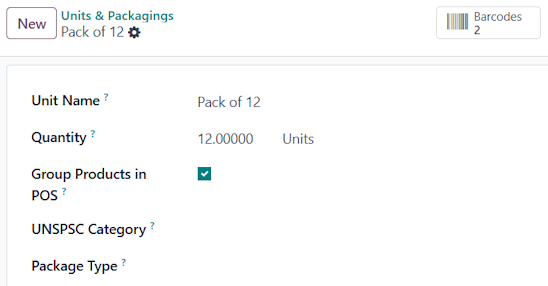
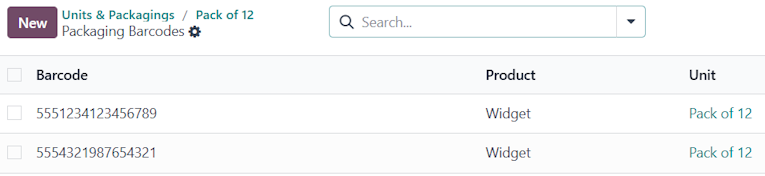
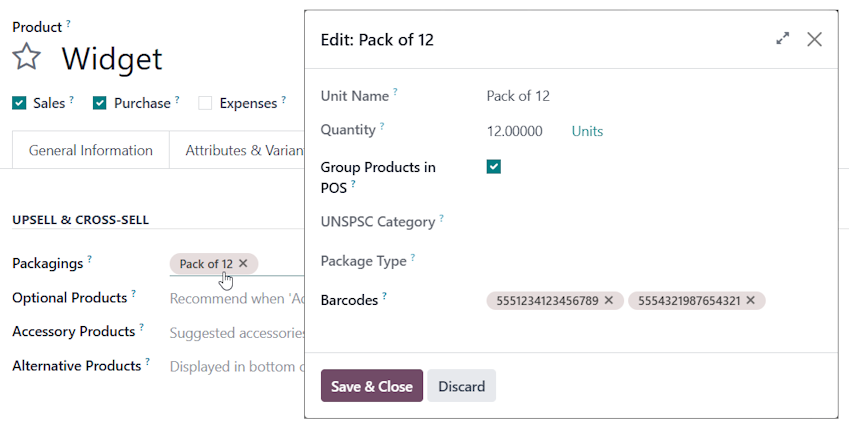
Click the Packaging once you have assigned it to one or more products, where you will be able to associate it with one or more barcodes.


You will then see a Smart button at the top of the Packaging record when you open it via Inventory --> Configuration -->Products --> Units & Packagings


1
अवतार
खारिज करें
अवतार
Cybrosys Techno Solutions Pvt.Ltd
Best Answer

Hi,

Please refer to the following links:

1. https://www.odoo.com/documentation/18.0/applications/inventory_and_mrp/inventory/product_management/configure/uom.html

2. https://www.odoo.com/documentation/18.0/applications/inventory_and_mrp/inventory/product_management/configure/packaging.html

3. https://www.odoo.com/documentation/14.0/applications/inventory_and_mrp/inventory/management/products/usage.html


Hope it helps

-1
अवतार
खारिज करें
Enjoying the discussion? Don't just read, join in!

Create an account today to enjoy exclusive features and engage with our awesome community!

साइन अप करें
Related Posts Replies डेटा देखने का तरीका ऐक्टिविटी
Use USB Barcode Scanner to update inventory on each product (Odoo 16 Community)
inventory barcode
अवतार
अवतार
1
जून 25
3570
Odoo Barcode : Split product Lines
inventory barcode
अवतार
0
फ़र॰ 23
3501
Is the Zebra ZT410 Supported in Odoo 13
inventory barcode
अवतार
0
जुल॰ 21
3601
Help with UoM and product_second_uom
inventory uom
अवतार
अवतार
1
मार्च 15
8083
How to scan barcode out / in
barcodescanner inventory barcode
अवतार
अवतार
अवतार
3
मई 25
5785
कम्यूनिटी
  • ट्यूटोरियल्स
  • दस्तावेज़
  • फ़ोरम
ओपन सोर्स
  • डाउनलोड
  • Github
  • रनबॉट
  • अनुवाद
सेवाएं
  • Odoo.sh Hosting
  • सहायता
  • अपग्रेड
  • कस्टम डेवलपमेंट्स
  • शिक्षा
  • अकाउंटेंट खोजें
  • पार्टनर ढूंढें
  • पार्टनर बनें
हमारे बारे में
  • हमारी कंपनी
  • ब्रांड ऐसेट
  • संपर्क करें
  • नौकरियां
  • इवेंट
  • पॉडकास्ट
  • ब्लॉग
  • ग्राहक
  • लीगल • गोपनीयता
  • सुरक्षा
الْعَرَبيّة Català 简体中文 繁體中文 (台灣) Čeština Dansk Nederlands English Suomi Français Deutsch हिंदी Bahasa Indonesia Italiano 日本語 한국어 (KR) Lietuvių kalba Język polski Português (BR) română русский язык Slovenský jazyk Slovenščina Español (América Latina) Español Svenska ภาษาไทย Türkçe українська Tiếng Việt

Odoo, बिज़नेस से जुड़े ऐप्लिकेशन का एक कलेक्शन है जो ओपन सोर्स पर आधारित है. इसमें आपकी कंपनी की हर ज़रूरत के लिए ऐप्लिकेशन हैं. जैसे, सीआरएम, ई-कॉमर्स, अकाउंटिंग, इन्वेंट्री, पॉइंट ऑफ़ सेल, प्रोजेक्ट मैनेजमेंट वगैरह.

Odoo की सबसे बड़ी खासियत है कि यह इस्तेमाल करने में बहुत आसान है और यह पूरी तरह से इंटिग्रेट किया हुआ है.

Website made with

Odoo Experience on YouTube

1. Use the live chat to ask your questions.
2. The operator answers within a few minutes.

Live support on Youtube
Watch now