Skip to Content
Odoo मेन्यू
  • साइन इन करें
  • मुफ़्त में आज़माएं
  • ऐप्लिकेशन
    फ़ाइनेंस
    • अकाउंटिंग
    • इनवॉइसिंग
    • एक्सपेंस
    • स्प्रेडशीट (बीआई)
    • डॉक्यूमेंट्स
    • साइन
    सेल्स
    • सीआरएम
    • सेल्स
    • पीओएस शॉप
    • पीओएस रेस्टोरेंट
    • सब्सक्रिप्शन
    • रेंटल
    वेबसाइट
    • वेबसाइट बिल्डर
    • ई-कॉमर्स
    • ब्लॉग
    • फ़ोरम
    • लाइव चैट
    • ई-लर्निंग
    सप्लाई चेन
    • इन्वेंट्री
    • मैन्युफ़ैक्चरिंग
    • पीएलएम
    • परचेज़
    • मेंटेनेंस
    • क्वालिटी
    मानव संसाधन
    • कर्मचारी
    • रिक्रूटमेंट
    • टाइम ऑफ़
    • अप्रेज़ल
    • रेफ़रल
    • फ़्लीट
    मार्केटिंग
    • सोशल मार्केटिंग
    • ईमेल मार्केटिंग
    • एसएमएस मार्केटिंग
    • इवेंट
    • मार्केटिंग ऑटोमेशन
    • सर्वे
    सेवाएं
    • प्रोजेक्ट
    • टाइमशीट
    • फ़ील्ड सर्विस
    • हेल्पडेस्क
    • प्लानिंग
    • अपॉइंटमेंट
    प्रॉडक्टिविटी
    • डिस्कस
    • आर्टिफ़िशियल इंटेलिजेंस
    • आईओटी
    • वीओआईपी
    • नॉलेज
    • WhatsApp
    तीसरे पक्ष के ऐप्लिकेशन Odoo स्टूडियो Odoo क्लाउड प्लेटफ़ॉर्म
  • इंडस्ट्री
    रीटेल
    • बुक स्टोर
    • क्लोदिंग स्टोर
    • फ़र्नीचर स्टोर
    • ग्रॉसरी स्टोर
    • हार्डवेयर स्टोर
    • टॉय स्टोर
    फ़ूड & हॉस्पिटैलिटी
    • बार और पब
    • रेस्टोरेंट
    • फ़ास्ट फ़ूड
    • गेस्ट हाउस
    • बेवरिज डिस्ट्रीब्यूटर
    • होटल
    रियल एस्टेट
    • रियल एस्टेट एजेंसी
    • आर्किटेक्चर फ़र्म
    • कंसट्रक्शन
    • प्रॉपर्टी मैनेजमेंट
    • गार्ड्निंग
    • प्रॉपर्टी ओनर असोसिएशन
    कंसल्टिंग
    • अकाउंटिंग फ़र्म
    • Odoo पार्टनर
    • मार्केटिंग एजेंसी
    • लॉ फ़र्म
    • टैलेंट ऐक्विज़िशन
    • ऑडिट & सर्टिफ़िकेशन
    मैन्युफ़ैक्चरिंग
    • टेक्सटाइल
    • धातु
    • फ़र्नीचर
    • फ़ूड
    • ब्रुअरी
    • कॉर्पोरेट गिफ़्ट
    हेल्थ & फिटनेस
    • स्पोर्ट्स क्लब
    • आईवियर स्टोर
    • फिटनेस सेंटर
    • वेलनेस प्रैक्टिशनर
    • फॉर्मेसी
    • हेयर सैलून
    व्यापार
    • Handyman
    • आईटी हार्डवेयर & सपोर्ट
    • सोलर एनर्जी सिस्टम
    • शू मेकर
    • साफ-सफाई से जुड़ी सेवाएं
    • HVAC सर्विस
    अन्य
    • गैर-लाभकारी संगठन
    • एन्वायरमेंटल एजेंसी
    • बिलबोर्ड रेंटल
    • फ़ोटोग्राफी
    • बाइक लीजिंग
    • सॉफ़्टवेयर रीसेलर
    सभी इंडस्ट्री को ब्राउज़ करें
  • कम्यूनिटी
    सीखें
    • ट्यूटोरियल्स
    • दस्तावेज़
    • सर्टिफ़िकेशन
    • ट्रेनिंग
    • ब्लॉग
    • पॉडकास्ट
    शिक्षा को बढ़ावा दें
    • एजुकेशन प्रोग्राम
    • स्केल अप! बिजनेस गेम
    • Odoo के ऑफ़िस में आएं
    सॉफ़्टवेयर पाएं
    • डाउनलोड
    • वर्शन की तुलना करें
    • रिलीज़
    साथ मिलकर काम करें
    • Github
    • फ़ोरम
    • इवेंट
    • अनुवाद
    • पार्टनर बनें
    • पार्टनर के लिए सेवाएं
    • अपना अकाउंटिंग फ़र्म रजिस्टर करें
    सेवाएं पाएं
    • पार्टनर ढूंढें
    • अकाउंटेंट खोजें
    • सलाहकार की मदद लें
    • इम्प्लिमेंटेशन सेवाएं
    • कस्टमर रेफ़रेंस
    • सहायता
    • अपग्रेड
    Github Youtube Twitter Linkedin Instagram Facebook Spotify
    +1 (650) 691-3277
    डेमो देखें
  • कीमत
  • सहायता
You need to be registered to interact with the community.
All Posts People Badges
टैग (View all)
odoo accounting v14 pos v15
About this forum
You need to be registered to interact with the community.
All Posts People Badges
टैग (View all)
odoo accounting v14 pos v15
About this forum
सहायता

What is the best practice of using Odoo Studio?

Subscribe

Get notified when there's activity on this post

This question has been flagged
developmentstudio
2 Replies
2691 डेटा देखने का तरीका
अवतार
周雨婷 Iris Chau

Hi all,


I am new to Odoo Studio and i want to know what is the best practice of developing new features with Odoo Studio. 

How to I do the source control / version control when i do development with Odoo studio? Which environment should i use? PRD, testing or dev? 


Anything I should aware when i use Odoo Studio? 


Thanks 

Iris

0
अवतार
खारिज करें
अवतार
Christoph Farnleitner
Best Answer

How to I do the source control / version control when i do development with Odoo studio?

There is no version control built in into Odoo for Studio customization. You can however Export Studio customization via Settings -> Technical --> Database Structure -> Studio Export and version control it externally.

Which environment should i use? PRD, testing or dev?

Depends on whether you know what you're doing. Given the fact that you can Export and Import Studio customization, I'd suggest to start with a testing environment, test your changes and then import it to production.

Anything I should aware when i use Odoo Studio?

Studio creates generic code. This is especially true for view modifications. Expect headaches with these when upgrading Odoo to newer versions.


Example:

<data>
  <xpath expr="/form/sheet/notebook/page[@name='lead']/group/group[2]/field[@name='function']" position="after">
    <field name="x_studio_demo"/>
  </xpath>
</data>

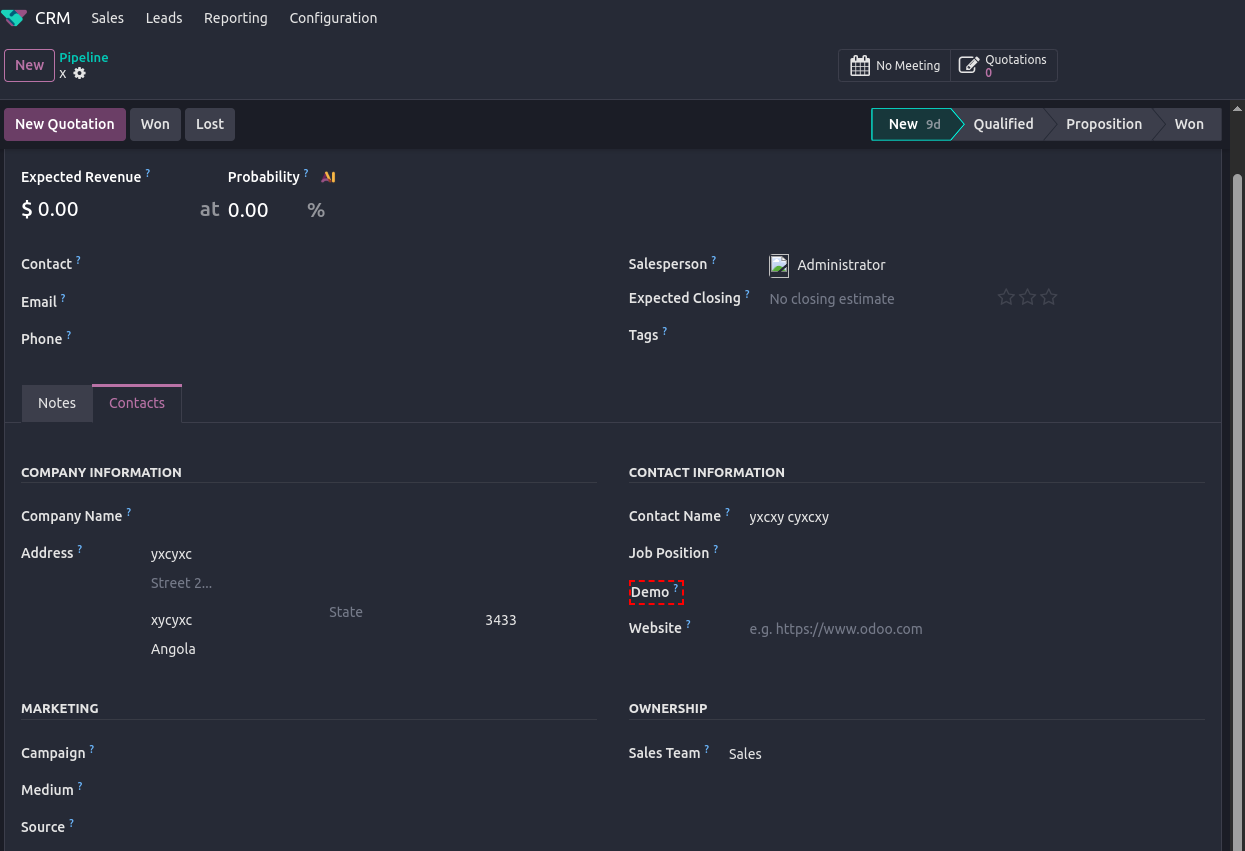
Above view addition doesn't do more than adding a field Demo to a particular area of the CRM form:


Personal opinion:

If this looks oddly specific to you - it is. And that's one general draw back when using Studio. Thus, when modifying views with Studio and you need to debug or upgrade it, be prepared to count nodes a lot.

Another thing to keep in mind: Don't mix custom developments (actual custom modules) with Studio customization. This is especially true when you feel like you need to use a x_studio_-field (a field created via Studio) in a custom module. I guarantee you would regret it at some point.

A general word of advice: If you have to use Studio, don't overdo it just because it looks simple right now. Any modification will have to be maintained in one or the other way. Potentially not having actual source code at hand to read makes debugging no fun. Also, Studio customization can't be documented directly (views may be edited later on but the lack of actual model files will leave you with guess-worthy field definitions). Don't forget you're manipulating your ERP software, thus, handle with care.

2
अवतार
खारिज करें
Chris TRINGHAM

Also, you will have to repeat the changes that you made in your development database to apply it to testing or production.

https://odootricks.tips/odoo-studio/

अवतार
Cybrosys Techno Solutions Pvt.Ltd
Best Answer

Hi,


Odoo Studio is great for quick customizations but not complex development. Always start with a clear goal, sketch your UI changes, and never develop directly in your production environment. Use separate development and testing environments first. Make small, incremental changes, testing after each one, and meticulously document everything since Studio lacks built-in change tracking. Be aware of Studio's limitations, especially its limited code customization and potential performance impacts.


Since Studio lacks native version control, manually document all changes and, if you have Odoo Enterprise, export your customizations as a module and add it to a Git repository. This provides snapshots of your changes. Remember that Studio customizations can be affected by Odoo upgrades, so test thoroughly after each upgrade. For complex features, consider traditional Odoo development instead.


Reference:-

* https://www.youtube.com/watch?v=laF9XUPaCc4

* https://www.odoo.com/documentation/19.0/applications/studio.html

* https://www.youtube.com/playlist?list=PL1-aSABtP6ADrLdkRuSAuLPd7qqql4T8c

* https://www.cybrosys.com/blog/how-to-customize-views-reports-in-odoo-18-studio


Hope it helps

0
अवतार
खारिज करें
Enjoying the discussion? Don't just read, join in!

Create an account today to enjoy exclusive features and engage with our awesome community!

साइन अप करें
Related Posts Replies डेटा देखने का तरीका ऐक्टिविटी
Obtener edad desde fecha de nacimiento / Get age from date of birth Solved
development studio V18.1
अवतार
अवतार
2
मार्च 25
2766
NOW!! We are going to start Whitehat SEO Class From Monday.
development
अवतार
0
जून 26
10
Barcode
development
अवतार
0
जून 26
497
Partage d'expérience : J'ai développé un client Windows pour Odoo POS
development
अवतार
अवतार
2
जून 26
1664
¿Cómo hablo con alguien de Avianca?** {{🎟️ Ayuda con Reservas y Viajes}}
development
अवतार
0
जून 26
3
कम्यूनिटी
  • ट्यूटोरियल्स
  • दस्तावेज़
  • फ़ोरम
ओपन सोर्स
  • डाउनलोड
  • Github
  • रनबॉट
  • अनुवाद
सेवाएं
  • Odoo.sh Hosting
  • सहायता
  • अपग्रेड
  • कस्टम डेवलपमेंट्स
  • शिक्षा
  • अकाउंटेंट खोजें
  • पार्टनर ढूंढें
  • पार्टनर बनें
हमारे बारे में
  • हमारी कंपनी
  • ब्रांड ऐसेट
  • संपर्क करें
  • नौकरियां
  • इवेंट
  • पॉडकास्ट
  • ब्लॉग
  • ग्राहक
  • लीगल • गोपनीयता
  • सुरक्षा
الْعَرَبيّة Català 简体中文 繁體中文 (台灣) Čeština Dansk Nederlands English Suomi Français Deutsch हिंदी Bahasa Indonesia Italiano 日本語 한국어 (KR) Lietuvių kalba Język polski Português (BR) română русский язык Slovenský jazyk Slovenščina Español (América Latina) Español Svenska ภาษาไทย Türkçe українська Tiếng Việt

Odoo, बिज़नेस से जुड़े ऐप्लिकेशन का एक कलेक्शन है जो ओपन सोर्स पर आधारित है. इसमें आपकी कंपनी की हर ज़रूरत के लिए ऐप्लिकेशन हैं. जैसे, सीआरएम, ई-कॉमर्स, अकाउंटिंग, इन्वेंट्री, पॉइंट ऑफ़ सेल, प्रोजेक्ट मैनेजमेंट वगैरह.

Odoo की सबसे बड़ी खासियत है कि यह इस्तेमाल करने में बहुत आसान है और यह पूरी तरह से इंटिग्रेट किया हुआ है.

Website made with

Odoo Experience on YouTube

1. Use the live chat to ask your questions.
2. The operator answers within a few minutes.

Live support on Youtube
Watch now