
ePOS printers
ePOS printers zijn ontworpen om naadloos samen te werken met Point of Sale systemen. Eenmaal verbonden delen deze apparaten automatisch informatie, waardoor tickets direct van het POS systeem naar de ePOS printer kunnen worden geprint.
Configuratie
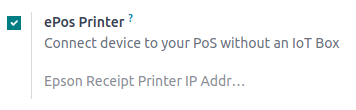
To use an ePos printer in Point of Sale:
Activate the ePos Printer feature.
Fill in the field with your ePos IP address.
Notitie
When the printer connects to a network, it automatically prints a ticket with its IP address.
Directly supported ePOS printers
De volgende ePOS printers zijn direct compatibel met Odoo zonder dat je een IoT Box nodig hebt.
Epson TM-m30 i/ii/iii (alleen Wi-Fi-/Ethernetmodellen; aanbevolen)
Epson TM-H6000IV-DT (Receipt printer only)
Epson TM-T70II-DT
Epson TM-T88V-DT
Epson TM-L90-i
Epson TM-T70-i
Epson TM-T82II-i
Epson TM-T83II-i
Epson TM-U220-i
Epson TM-m10
Epson TM-P20 (Wi-Fi®-model)
Epson TM-P60II (ontvangstbewijs: Wi-Fi®-model)
Epson TM-P60II (Schilmesje: Wi-Fi®-model)
Epson TM-P80 (Wi-Fi® model)
ePOS-printers met IoT Box-integratie
De volgende printers hebben een IoT Box nodig om compatibel te zijn met Odoo:
Epson TM-T20-serie (incompatibele ePOS-software)
Epson TM-T88-serie (incompatibele ePOS-software)
Epson TM-U220-serie (incompatibele ePOS-software)
Belangrijk
Epson printers using Wi-Fi/Ethernet connections and following the EPOS SDK Javascript protocol are compatible with Odoo without needing an IoT Box.
Thermal printers using ESC/POS or StarPRNT protocol are compatible with an IoT Box.
Epson printers using only USB connections are compatible with an IoT Box.
Epson printers that connect via Bluetooth are not compatible.