Zum Inhalt springen
Odoo Menü
  • Anmelden
  • Jetzt gratis testen
  • Apps
    Finanzen
    • Buchhaltung
    • Rechnungsstellung
    • Spesenabrechnung
    • Tabellenkalkulation (BI)
    • Dokumente
    • E-Signatur
    Verkauf
    • CRM
    • Verkauf
    • Kassensystem – Shop
    • Kassensystem – Restaurant
    • Abonnements
    • Vermietung
    Websites
    • Website-Builder
    • E-Commerce
    • Blog
    • Forum
    • Livechat
    • E-Learning
    Lieferkette
    • Lager
    • Fertigung
    • PLM
    • Einkauf
    • Wartung
    • Qualität
    Personalwesen
    • Mitarbeiter
    • Personalbeschaffung
    • Abwesenheiten
    • Mitarbeiterbeurteilung
    • Personalempfehlungen
    • Fuhrpark
    Marketing
    • Social Marketing
    • E-Mail-Marketing
    • SMS-Marketing
    • Veranstaltungen
    • Marketing-Automatisierung
    • Umfragen
    Dienstleistungen
    • Projekte
    • Zeiterfassung
    • Außendienst
    • Kundendienst
    • Planung
    • Termine
    Produktivität
    • Dialog
    • Künstliche Intelligenz
    • IoT
    • VoIP
    • Wissensdatenbank
    • WhatsApp
    Apps von Drittanbietern Odoo Studio Odoo Cloud-Plattform
  • Branchen
    Einzelhandel
    • Buchladen
    • Kleidergeschäft
    • Möbelhaus
    • Lebensmittelgeschäft
    • Baumarkt
    • Spielwarengeschäft
    Essen & Gastgewerbe
    • Bar und Kneipe
    • Restaurant
    • Fast Food
    • Gästehaus
    • Getränkehändler
    • Hotel
    Immobilien
    • Immobilienagentur
    • Architekturbüro
    • Baugewerbe
    • Immobilienverwaltung
    • Gartenarbeit
    • Eigentümervereinigung
    Beratung
    • Buchhaltungsfirma
    • Odoo-Partner
    • Marketingagentur
    • Anwaltskanzlei
    • Talentakquise
    • Prüfung & Zertifizierung
    Fertigung
    • Textil
    • Metall
    • Möbel
    • Speisen
    • Brauerei
    • Firmengeschenke
    Gesundheit & Fitness
    • Sportklub
    • Brillengeschäft
    • Fitnessstudio
    • Therapeut
    • Apotheke
    • Friseursalon
    Handel
    • Handyman
    • IT-Hardware & -Support
    • Solarenergiesysteme
    • Schuster
    • Reinigungsdienstleistungen
    • HLK-Dienstleistungen
    Sonstiges
    • Gemeinnützige Organisation
    • Umweltschutzagentur
    • Plakatwandvermietung
    • Fotostudio
    • Fahrrad-Leasing
    • Software-Händler
    Alle Branchen ansehen
  • Community
    Lernen
    • Tutorials
    • Dokumentation
    • Zertifizierungen
    • Schulung
    • Blog
    • Podcast
    Bildung fördern
    • Bildungsprogramm
    • Scale-Up! Planspiel
    • Odoo besuchen
    Software anfragen
    • Herunterladen
    • Editionen vergleichen
    • Releases
    Zusammenarbeiten
    • Github
    • Forum
    • Veranstaltungen
    • Übersetzungen
    • Partner werden
    • Dienstleistungen für Partner
    • Buchhaltungsfirma registrieren
    Services anfragen
    • Partner finden
    • Buchhalter finden
    • Einen Experten treffen
    • Implementierungsservices
    • Kundenreferenzen
    • Support
    • Upgrades
    Github Youtube Twitter Linkedin Instagram Facebook Spotify
    +1 (650) 691-3277
    Eine Demo erhalten
  • Preise
  • Hilfe
Sie müssen registriert sein, um mit der Community zu interagieren.
Alle Beiträge Personen Abzeichen
Stichwörter (Alle anzeigen)
odoo accounting v14 pos v15
Über dieses Forum
Sie müssen registriert sein, um mit der Community zu interagieren.
Alle Beiträge Personen Abzeichen
Stichwörter (Alle anzeigen)
odoo accounting v14 pos v15
Über dieses Forum
Hilfe

Import from Winbooks

Abonnieren

Erhalten Sie eine Benachrichtigung, wenn es eine Aktivität zu diesem Beitrag gibt

Diese Frage wurde gekennzeichnet
import
4 Antworten
9126 Ansichten
Avatar
www.ecoledelabas.be, Vincent

We are looking to import data from the accounting software "Winbooks" (in Belgium) to Odoo accounting. We use Winbooks during previous years but doo until 2023. We want to recover old Winbooks data into Odoo.

Any idea on using a Odoo import function or an added module ?

0
Avatar
Verwerfen
Avatar
Robin Verlinden (rvn)
Beste Antwort

Hello Vincent,

By default an import module exists for Winbooks in Odoo.
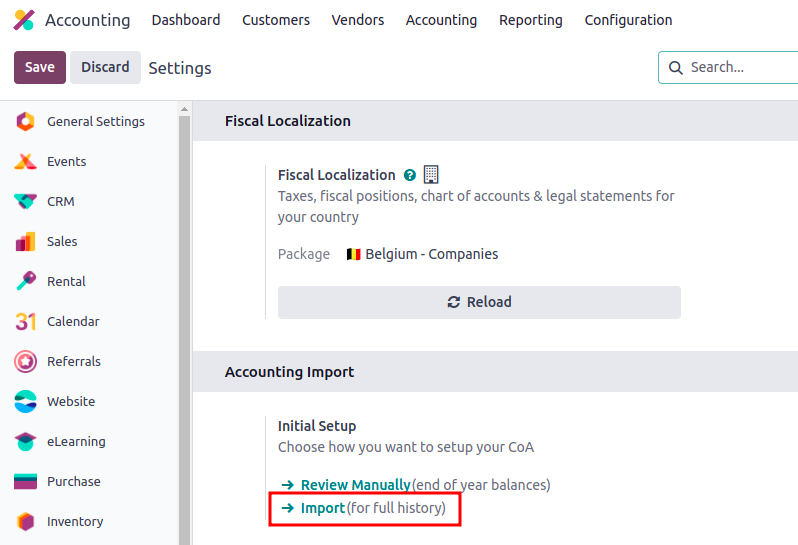
To access it you need to go into the Accounting app > Settings > Accounting Import section.

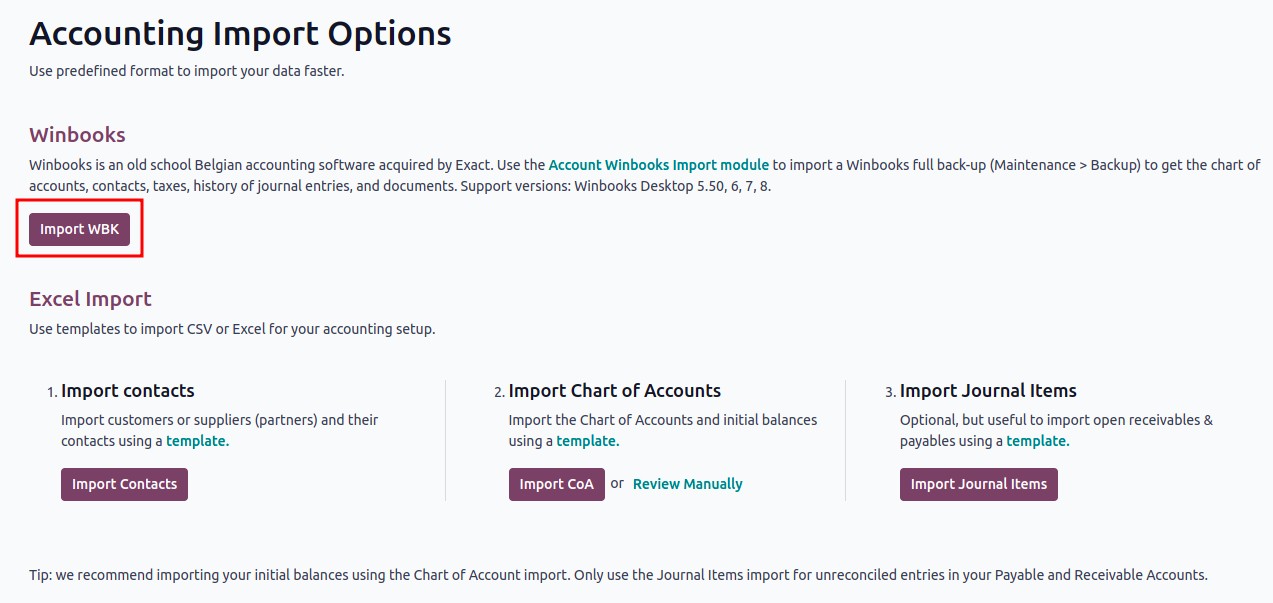
Once you have clicked on that button you will have following view and will be able to upload your data coming from Winbooks.

You will be able to upload your data coming from Winbooks by uploading a full back-up from that software. As explained in the above screenshot you need to go into Maintenance > Back-up of Winbooks to have that file.

If you have any issue regarding the import I invite you to contact odoo.com/help. The colleagues from the support team will make sure to help you get through.

I hope this helps you further and welcome on Odoo.

1
Avatar
Verwerfen
A Zesty Solution, Basil Burléon

Hi Robin,

My accountant was using winbooks and I want to shift the accounting in Odoo. He agreed to it and wants to import the winbooks CoA, journals and opening balance.

However, I see 3 problems now :
1) Since January I started creating my invoices in Odoo, my accountant was re encoding everything in winbooks. I have no idea if the journals and accounts used match what he did in winbooks.
2) I also launched an Ecommerce site this month and made a few sales.
3) I imported all my invoices and vendor bills from last year as I wanted to have a starting point.

I guess I have a correct starting balance but it is maybe not in the right accounts for my accountant.
How can I import his Winbooks CoA even though I already used the Odoo standard CoA for Belgium?
Or do I have to delete everything and import the winbooks backup? is it possible? I made a few sales already :/
Do we have to go through everything manually now?

Thank you for your help and this already helpful answer.

Robin Verlinden (rvn)

Hello Basil,

If you only have a few sales and it is easier to take over the data from winbooks, activate the 'Invoicing Switch Threshold' in the accounting settings to clear all the accounting in Odoo. (all accounting entries will be cancelled) Then do the import from Winbooks. It will take all the info from the previous system in Odoo. I trust the accountant knows which journals is needed and which accounts are needed.

Second option: If your accountant did not all the entries since beginning of the year in Winbooks (what I doubt). That would mean that the few entries coming from Winbooks from 01/01/2024 would need to be deleted in order to avoid double entries in Odoo. So after importing the module of Winbooks, delete the entries from 01/01/2024 coming from Winbooks and create all entries again.
This will make it possible to have everything before 01/01/204 linked to Winbooks in Odoo and from 01/01/2024 the accounting in Odoo. However, this means more rework time.

In any case, from 01/01/2024 the accounting will be done completely in Odoo and your accountant will need to verify accordingly.

Note that:
1. All data from winbooks will be imported (contacts, accounting entries and also the CoA)
No need to import the CoA from Winbooks as the module does it.
2. The import from Winbooks is in draft and still needs to be verified and confirmed.
3. If accounts need to be changed, it is possible through the journal items > choose the account > 'Action' button > Change account

Avatar
Antoine Perdaens
Beste Antwort

At the end we used Twinbooks services to import our 12+ years winbooks historical data (attachements, assets, analytical, ...) worked quite well and was super fast.

1
Avatar
Verwerfen
Avatar
Aymeric de Bergeyck
Beste Antwort

Hello Robin, Can this option replace an API/SFTP integration or do you advice for integrations to work with a separate API/SFTP integration?

0
Avatar
Verwerfen
Avatar
Thuy Ngoc
Beste Antwort

Hi Vincent,

If you can put those data into excel files, the following module can help solve your problem easily: https://www.youtube.com/watch?v=Auaqj6WtdcM&list=PLSKcWRTtEl5qzvRaI-VTGavfReiHS_EEb&index=5

0
Avatar
Verwerfen
Diskutieren Sie gerne? Treten Sie bei, statt nur zu lesen!

Erstellen Sie heute ein Konto, um exklusive Funktionen zu nutzen und mit unserer tollen Community zu interagieren!

Registrieren
Verknüpfte Beiträge Antworten Ansichten Aktivität
Import Contact Notes (Help! Which is the correct Odoo Field?) Gelöst
import
Avatar
Avatar
Avatar
2
Dez. 25
1982
Importacion de Atributos y Valores
import
Avatar
Avatar
Avatar
Avatar
3
Dez. 25
4293
Issue with import and comma in Excel File (odoo 19)
import
Avatar
0
Sept. 25
236
can i import journal entries from Excel
import
Avatar
Avatar
1
Aug. 24
5029
Odoo 17 Studio
import
Avatar
Avatar
1
Feb. 24
4987
Community
  • Tutorials
  • Dokumentation
  • Forum
Open Source
  • Herunterladen
  • Github
  • Runbot
  • Übersetzungen
Dienstleistungen
  • Odoo.sh-Hosting
  • Support
  • Upgrade
  • Individuelle Entwicklungen
  • Bildung
  • Buchhalter finden
  • Partner finden
  • Partner werden
Über uns
  • Unsere Firma
  • Markenwerte
  • Kontakt
  • Karriere
  • Veranstaltungen
  • Podcast
  • Blog
  • Kunden
  • Rechtliches • Datenschutz
  • Sicherheit
الْعَرَبيّة Català 简体中文 繁體中文 (台灣) Čeština Dansk Nederlands English Suomi Français Deutsch हिंदी Bahasa Indonesia Italiano 日本語 한국어 (KR) Lietuvių kalba Język polski Português (BR) română русский язык Slovenský jazyk Slovenščina Español (América Latina) Español Svenska ภาษาไทย Türkçe українська Tiếng Việt

Odoo ist eine Suite von Open-Source-Betriebsanwendungen, die alle Bedürfnisse Ihres Unternehmens abdecken: CRM, E-Commerce, Buchhaltung, Lager, Kassensystem, Projektmanagement etc.

Das einzigartige Wertversprechen von Odoo ist, dass es gleichzeitig sehr einfach zu bedienen und voll integriert ist.

Website made with

Odoo Experience on YouTube

1. Use the live chat to ask your questions.
2. The operator answers within a few minutes.

Live support on Youtube
Watch now