Zum Inhalt springen
Odoo Menü
  • Anmelden
  • Jetzt gratis testen
  • Apps
    Finanzen
    • Buchhaltung
    • Rechnungsstellung
    • Spesenabrechnung
    • Tabellenkalkulation (BI)
    • Dokumente
    • E-Signatur
    Verkauf
    • CRM
    • Verkauf
    • Kassensystem – Shop
    • Kassensystem – Restaurant
    • Abonnements
    • Vermietung
    Websites
    • Website-Builder
    • E-Commerce
    • Blog
    • Forum
    • Livechat
    • E-Learning
    Lieferkette
    • Lager
    • Fertigung
    • PLM
    • Einkauf
    • Wartung
    • Qualität
    Personalwesen
    • Mitarbeiter
    • Personalbeschaffung
    • Abwesenheiten
    • Mitarbeiterbeurteilung
    • Personalempfehlungen
    • Fuhrpark
    Marketing
    • Social Marketing
    • E-Mail-Marketing
    • SMS-Marketing
    • Veranstaltungen
    • Marketing-Automatisierung
    • Umfragen
    Dienstleistungen
    • Projekte
    • Zeiterfassung
    • Außendienst
    • Kundendienst
    • Planung
    • Termine
    Produktivität
    • Dialog
    • Künstliche Intelligenz
    • IoT
    • VoIP
    • Wissensdatenbank
    • WhatsApp
    Apps von Drittanbietern Odoo Studio Odoo Cloud-Plattform
  • Branchen
    Einzelhandel
    • Buchladen
    • Kleidergeschäft
    • Möbelhaus
    • Lebensmittelgeschäft
    • Baumarkt
    • Spielwarengeschäft
    Essen & Gastgewerbe
    • Bar und Kneipe
    • Restaurant
    • Fast Food
    • Gästehaus
    • Getränkehändler
    • Hotel
    Immobilien
    • Immobilienagentur
    • Architekturbüro
    • Baugewerbe
    • Immobilienverwaltung
    • Gartenarbeit
    • Eigentümervereinigung
    Beratung
    • Buchhaltungsfirma
    • Odoo-Partner
    • Marketingagentur
    • Anwaltskanzlei
    • Talentakquise
    • Prüfung & Zertifizierung
    Fertigung
    • Textil
    • Metall
    • Möbel
    • Speisen
    • Brauerei
    • Firmengeschenke
    Gesundheit & Fitness
    • Sportklub
    • Brillengeschäft
    • Fitnessstudio
    • Therapeut
    • Apotheke
    • Friseursalon
    Handel
    • Handyman
    • IT-Hardware & -Support
    • Solarenergiesysteme
    • Schuster
    • Reinigungsdienstleistungen
    • HLK-Dienstleistungen
    Sonstiges
    • Gemeinnützige Organisation
    • Umweltschutzagentur
    • Plakatwandvermietung
    • Fotostudio
    • Fahrrad-Leasing
    • Software-Händler
    Alle Branchen ansehen
  • Community
    Lernen
    • Tutorials
    • Dokumentation
    • Zertifizierungen
    • Schulung
    • Blog
    • Podcast
    Bildung fördern
    • Bildungsprogramm
    • Scale-Up! Planspiel
    • Odoo besuchen
    Software anfragen
    • Herunterladen
    • Editionen vergleichen
    • Releases
    Zusammenarbeiten
    • Github
    • Forum
    • Veranstaltungen
    • Übersetzungen
    • Partner werden
    • Dienstleistungen für Partner
    • Buchhaltungsfirma registrieren
    Services anfragen
    • Partner finden
    • Buchhalter finden
    • Einen Experten treffen
    • Implementierungsservices
    • Kundenreferenzen
    • Support
    • Upgrades
    Github Youtube Twitter Linkedin Instagram Facebook Spotify
    +1 (650) 691-3277
    Eine Demo erhalten
  • Preise
  • Hilfe
Sie müssen registriert sein, um mit der Community zu interagieren.
Alle Beiträge Personen Abzeichen
Stichwörter (Alle anzeigen)
odoo accounting v14 pos v15
Über dieses Forum
Sie müssen registriert sein, um mit der Community zu interagieren.
Alle Beiträge Personen Abzeichen
Stichwörter (Alle anzeigen)
odoo accounting v14 pos v15
Über dieses Forum
Hilfe

Disable Followers

Abonnieren

Erhalten Sie eine Benachrichtigung, wenn es eine Aktivität zu diesem Beitrag gibt

Diese Frage wurde gekennzeichnet
followermail
1 Antworten
14672 Ansichten
Avatar
George M.

Is there any way to turn off followers on Odoo?


We want to avoid falsely sending mails out to followers which we don't intend to inform.


We are using Odoo saas~16.3+e (Enterprise-Edition)

0
Avatar
Verwerfen
Chris TRINGHAM

There are several add-ons for this, but as you are on saas you aren't able to install them. There's a possible solution using an Automated Action here: https://www.odoo.com/forum/help-1/remove-followers-from-so-except-user-211569

Avatar
Ray Carnes (ray)
Beste Antwort

You can't stop Odoo from adding followers to a Document, but you CAN

  • prevent followers from receiving ANY automated email notifications
  • prevent Users from accidentally sending emails to followers
  • force Users to choose recipients for each email Odoo sends


Note: Followers who are never sent any automated email notifications (see below for how to set this up) can also never be emailed unless they are added to the email via @ or as a Contact to notify – when using the full email composer. When automated email notifications are turned off either globally or for a specific record, Followers of the document functions as if it is empty.
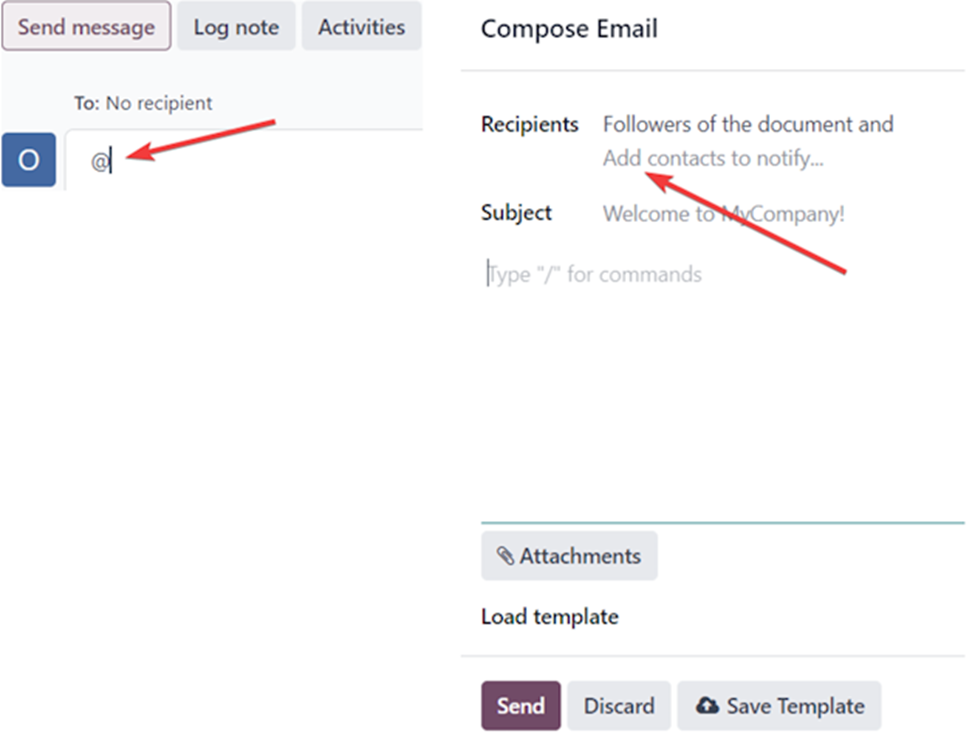


You can control this

  • globally
  • by Sales Team member
  • by Record / Document Type (Sales Order, Project, Task, etc.)


Frequently Asked Questions

Can I get my notifications inside Odoo instead of via email? - https://www.odoo.com/documentation/17.0/applications/productivity/discuss.html#choose-notifications-preference

What is a follower? - https://www.odoo.com/documentation/17.0/applications/productivity/discuss/chatter.html#add-followers

How do I manage who is following a Document? - https://www.odoo.com/documentation/17.0/applications/productivity/discuss/chatter.html#manage-followers

How do I manage what automated notifications a follower receives? - https://www.odoo.com/documentation/17.0/applications/productivity/discuss/chatter.html#edit-follower-subscription

What does SEND MESSAGE do? - https://www.odoo.com/documentation/17.0/applications/productivity/discuss/chatter.html#send-messages

What does LOG NOTE do? - https://www.odoo.com/documentation/17.0/applications/productivity/discuss/chatter.html#log-notes


How Odoo follower and automated email notifications work by default

  • Message Subtypes define the notifications followers can subscribe to
  • Each one manages a single automated notification
  • There are three global Subtypes – Activities, Discussions, Notes – which apply to every Record Type
  • All others are setup per Record type

There are four checkboxes on each

  1. Default - every follower is automatically subscribed (opt out if True, opt in if False)
  2. Internal Only - only applicable for Internal Users (Employees)
  3. Hidden - not available for opt out via subscription management
  4. Track Recipients - shows the envelope icon to track who did and did not get the notification


They can be accessed in Developer Mode via Settings --> Technical --> Discuss --> Subtypes


The three global Subtypes:
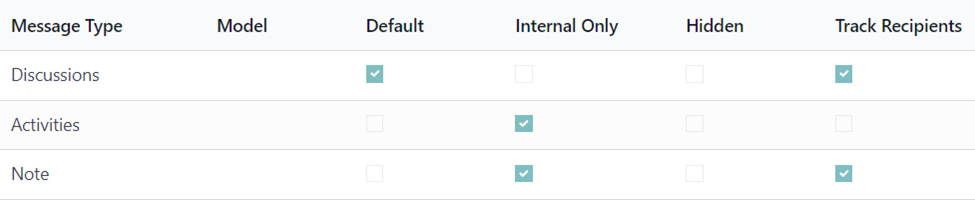


Discussions – opt out - automatically applied to every follower. They all get a notification of every Message (they are blind copied on emails). The envelope icon* is shown to give Users access to verify if each recipient received the message.

Activities – opt in – applies to INTERNAL followers only. They get a notification of every Activity scheduled.

Note – opt in – applies to INTERNAL followers only. They get a notification of every Note added. The envelope icon* is shown to give Users access to verify if each recipient received the message


Remember that anyone who is specifically added when using SEND MESSAGE or LOG NOTE becomes a follower.  They receive that SINGLE email and by default get a copy of all others sent via SEND MESSAGE. LOG NOTE is only sent to the users specified via @ or those who have the Note subscription.


The default configuration of these three Subtypes means

  • anyone who is specifically named via @ will receive an email notification with a copy of what was sent via SEND MESSAGE or LOG NOTE.
  • everyone who is following a document receives an email notification with a copy of what was sent via SEND MESSAGE
  • only users who opt in will receive an email notification with a copy of what was sent via LOG NOTE
  • only users who opt in will receive a copy of email notifications related to Scheduled Activities


You can control which email notifications are sent out by modifying the way these Subtypes are setup. You can create a Discussions subtype per record where you want finer control. You can edit the Subtypes to determine when followers are automatically subscribed and when they have the option to subscribe and unsubscribe.


Common Configurations

"We don't want any emails going to people automatically. We want to manually email people AND specify each time who the email goes to."

  • unmark the Dicussions Subtype as Default. 
  • You will now have to explicitly @ the recipients for every Message you send, except the first time you send one to the Customer or Vendor BUT you will have an option to uncheck them from the first Message. In this way, Users are aware who they are sending the manual email to each time. Just the first Message.
  • Nobody will ever get an email they were not supposed to get because they have to be specifically added as a recipient via @.


"We are concerned about email notifications on Sales Orders and Invoices, we don't want any emails going to people automatically. We want Users to choose who gets every email that is sent out.”

  • unmark the Sales Order related Subtypes as Default.
  • You will now have to explicitly @ the recipients for every Message you add to a Document, except the first time you send one to the Customer BUT you will have an option to uncheck them from the Message. In this way, Users are aware who they are sending the manual email to each time. 
  • Nobody will ever get an email they were not supposed to get because they have to be specifically added as a recipient via @.


"We want to control automated email notifications for Sales Teams members"

  • Unmark as default the Sales Team based Subtypes as needed.
  • open each Team Member on each Team and change the notifications they are subscribed to.


"We want to control automated email notifications for Projects"

  • Unmark as default the Project based Subtypes as needed.


With ANY of these options, you can edit the Subtype subscriptions for Particular Sales Orders, Sales Teams, Projects, etc when you DO want automated email notifications to go out and/or when you do want followers to automatically receive copies of emails sent specifically to others (BCC).

With ANY of these options, Users still have the option to opt-in themselves, other Users and Customers or Vendor on a record by record basis.


4
Avatar
Verwerfen
Diskutieren Sie gerne? Treten Sie bei, statt nur zu lesen!

Erstellen Sie heute ein Konto, um exklusive Funktionen zu nutzen und mit unserer tollen Community zu interagieren!

Registrieren
Verknüpfte Beiträge Antworten Ansichten Aktivität
Copy paste multiple email id in recipients form in invite follower
follower mail
Avatar
0
Feb. 20
4205
add followers automatically Gelöst
follower mail openerp
Avatar
Avatar
Avatar
8
Juni 24
40640
How to disable auto-add followers in discussion groups - copy solution from mail_thread.py?
follower mail odoo8.0
Avatar
Avatar
Avatar
2
März 16
11553
Where is the function that send notification when their are some object's activity?
development follower mail
Avatar
1
März 15
8011
Notify a store an order has gone through their inventory
mail
Avatar
Avatar
Avatar
2
Juni 26
885
Community
  • Tutorials
  • Dokumentation
  • Forum
Open Source
  • Herunterladen
  • Github
  • Runbot
  • Übersetzungen
Dienstleistungen
  • Odoo.sh-Hosting
  • Support
  • Upgrade
  • Individuelle Entwicklungen
  • Bildung
  • Buchhalter finden
  • Partner finden
  • Partner werden
Über uns
  • Unsere Firma
  • Markenwerte
  • Kontakt
  • Karriere
  • Veranstaltungen
  • Podcast
  • Blog
  • Kunden
  • Rechtliches • Datenschutz
  • Sicherheit
الْعَرَبيّة Català 简体中文 繁體中文 (台灣) Čeština Dansk Nederlands English Suomi Français Deutsch हिंदी Bahasa Indonesia Italiano 日本語 한국어 (KR) Lietuvių kalba Język polski Português (BR) română русский язык Slovenský jazyk Slovenščina Español (América Latina) Español Svenska ภาษาไทย Türkçe українська Tiếng Việt

Odoo ist eine Suite von Open-Source-Betriebsanwendungen, die alle Bedürfnisse Ihres Unternehmens abdecken: CRM, E-Commerce, Buchhaltung, Lager, Kassensystem, Projektmanagement etc.

Das einzigartige Wertversprechen von Odoo ist, dass es gleichzeitig sehr einfach zu bedienen und voll integriert ist.

Website made with

Odoo Experience on YouTube

1. Use the live chat to ask your questions.
2. The operator answers within a few minutes.

Live support on Youtube
Watch now