Skip to Content
Odoo Menu
  • Log ind
  • Prøv gratis
  • Apps
    Økonomi
    • Bogføring
    • Fakturering
    • Udgifter
    • Regneark (BI)
    • Dokumenter
    • e-Signatur
    Salg
    • CRM
    • Salg
    • POS Butik
    • POS Restaurant
    • Abonnementer
    • Udlejning
    Hjemmeside
    • Hjemmesidebygger
    • e-Handel
    • Blog
    • Forum
    • LiveChat
    • e-Læring
    Forsyningskæde
    • Lagerbeholdning
    • Produktion
    • PLM
    • Indkøb
    • Vedligeholdelse
    • Kvalitet
    HR
    • Medarbejdere
    • Rekruttering
    • Fravær
    • Medarbejdersamtaler
    • Anbefalinger
    • Flåde
    Marketing
    • Markedsføring på sociale medier
    • E-mailmarketing
    • SMS-marketing
    • Arrangementer
    • Automatiseret marketing
    • Spørgeundersøgelser
    Tjenester
    • Projekt
    • Timesedler
    • Udkørende Service
    • Kundeservice
    • Planlægning
    • Aftaler
    Produktivitet
    • Dialog
    • Kunstig intelligens
    • IoT
    • VoIP
    • Vidensdeling
    • WhatsApp
    Tredjepartsapps Odoo Studio Odoo Cloud-platform
  • Brancher
    Detailhandel
    • Boghandel
    • Tøjforretning
    • Møbelforretning
    • Dagligvarebutik
    • Byggemarked
    • Legetøjsforretning
    Mad og værtsskab
    • Bar og pub
    • Restaurant
    • Fastfood
    • Gæstehus
    • Drikkevareforhandler
    • Hotel
    Ejendom
    • Ejendomsmægler
    • Arkitektfirma
    • Byggeri
    • Ejendomsadministration
    • Havearbejde
    • Boligejerforening
    Rådgivning
    • Regnskabsfirma
    • Odoo-partner
    • Marketingbureau
    • Advokatfirma
    • Rekruttering
    • Audit & certificering
    Produktion
    • Tekstil
    • Metal
    • Møbler
    • Fødevareproduktion
    • Bryggeri
    • Firmagave
    Heldbred & Fitness
    • Sportsklub
    • Optiker
    • Fitnesscenter
    • Kosmetolog
    • Apotek
    • Frisør
    Håndværk
    • Handyman
    • IT-hardware og support
    • Solenergisystemer
    • Skomager
    • Rengøringsservicer
    • VVS- og ventilationsservice
    Andet
    • Nonprofitorganisation
    • Miljøagentur
    • Udlejning af billboards
    • Fotografi
    • Cykeludlejning
    • Softwareforhandler
    Gennemse alle brancher
  • Community
    Få mere at vide
    • Tutorials
    • Dokumentation
    • Certificeringer
    • Oplæring
    • Blog
    • Podcast
    Bliv klogere
    • Udannelselsesprogram
    • Scale Up!-forretningsspillet
    • Besøg Odoo
    Få softwaren
    • Download
    • Sammenlign versioner
    • Udgaver
    Samarbejde
    • Github
    • Forum
    • Arrangementer
    • Oversættelser
    • Bliv partner
    • Tjenester til partnere
    • Registrér dit regnskabsfirma
    • Referral Program
    Modtag tjenester
    • Find en partner
    • Find en bogholder
    • Kontakt en rådgiver
    • Implementeringstjenester
    • Kundereferencer
    • Support
    • Opgraderinger
    Github Youtube Twitter LinkedIn Instagram Facebook Spotify
    +1 (650) 691-3277
    Få en demo
  • Prissætning
  • Hjælp
Du skal være registreret for at interagere med fællesskabet.
Alle bidrag Personer Emblemer
Tags (Vis alle)
odoo accounting v14 pos v15
Om dette forum
Du skal være registreret for at interagere med fællesskabet.
Alle bidrag Personer Emblemer
Tags (Vis alle)
odoo accounting v14 pos v15
Om dette forum
Hjælp

ODOO 18.3 create vendor bill, upload vendor bill

Tilmeld

Få besked, når der er aktivitet på dette indlæg

Dette spørgsmål er blevet anmeldt
purchaseaccounting
2 Besvarelser
2905 Visninger
Avatar
Ettore Alberto Pietro Lampertico

Vendor Bill can nomore be created by the purhcase app,

this for me is an important regression and move from a lean approach to a silos approach.

the purchase office is the responsible with relation with supplier.

It interacts with the supplier in handling all the aspect. Including price, quantity and payment

if the draft vendor bill is created by the buyer, it can reflect all those interactions.

when the real bill arrives, typically to accounting, the accounting can match it with the draft.

if the vendor bill is created by accounting then we retuns to have accounting people asking to the buyer explanation on differences.

Another point is that with exception of very small organization the vendor bill are sent to the accounting office or are left to logistic and not sent to buyer. So, the upload vendor bill button is not where it is needed.

there si any way to restore the create vendor bill button in purhcase order?

0
Avatar
Kassér
Avatar
Ray Carnes (ray)
Bedste svar

UPDATE: This is no longer necessary, simply select the Purchase Order in List View and use the Create Bills button:


ORIGINAL ANSWER:

Via Odoo Studio, you can add a button to the Purchase Order that creates the Bill.


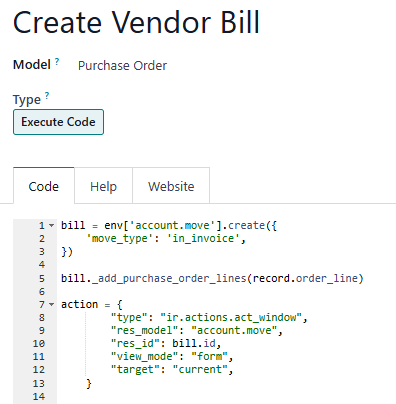
1. Create the following Server Action:

# code updated to add Vendor (which will add Payment Terms)

bill = env['account.move'].create({
    'move_type': 'in_invoice',
'partner_id': record.partner_id.id,
})

bill._add_purchase_order_lines(record.order_line)

action = {
        "type": "ir.actions.act_window",
        "res_model": "account.move",
        "res_id": bill.id,       
        "view_mode": "form",       
        "target": "current",     
    }


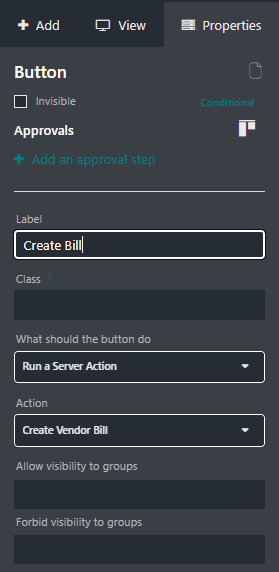
2. Add a New Button to the Purchase Order Form View:


Your Odoo Consultant or Odoo Partner can help you if you need support with this customization.

0
Avatar
Kassér
Ettore Alberto Pietro Lampertico
Forfatter

Thank you.
I hilight again this point to ODOO team, It is a sustantial change in the workflow,
the change on the workflow have to be an option, and the previous way have to be kept as default, at least in the update of the release.

Ettore Alberto Pietro Lampertico
Forfatter

I have tested your code,
it does not autofill the following fields
Referece, payment reference, and most important payment terms.

Ray Carnes (ray)

I updated the code to add the Vendor, which will also bring over the Payment Terms. Reference and Payment Reference are not set by the Odoo 18.0 Create Bill button - these normally come from the Vendor. You are free to extend this example to add more information on the Bill.

Ettore Alberto Pietro Lampertico
Forfatter

Thank you, unfortunately seems that it is fetching the payment terms from the vendor. they can be different on the specifc purchase order

Ray Carnes (ray)

Please see my updated answer, use the CREATE BILLS button from the List instead

Ettore Alberto Pietro Lampertico
Forfatter

Thank you Ray,
it is something and is good in some cases having a batch creation, It would be great to have a status that tell that there is something to invoice
But Buyers are responsible, they have to create and view the invoice, they may have something to add on it expecially in case of delay, anticipation or non conformity

Avatar
Cybrosys Techno Solutions Pvt.Ltd
Bedste svar

Hi,


You’ve highlighted what feels like a regression in Odoo’s workflow: in recent versions, vendor bills can no longer be created directly from the Purchase app. Traditionally, buyers—who manage the supplier relationship, prices, and quantities—could draft the vendor bill themselves. This allowed accounting to later validate the bill against what was agreed with the supplier, reducing back-and-forth.


Now, with vendor bills created only by the accounting team, it shifts responsibility away from the buyers and creates inefficiency. Accounting staff may have to chase buyers to resolve discrepancies, which undermines the lean, end-to-end approach where purchase officers managed the whole supplier process.


You also point out a practical issue: in most organizations, vendor bills are received directly by the accounting office (or sometimes logistics), not by buyers. Yet the “Upload Vendor Bill” function is located where the buyer doesn’t typically work. This creates friction, as the functionality isn’t aligned with the real-life flow of documents between departments.


In short: the change moves Odoo from a lean, integrated workflow to a more siloed approach, where purchase and accounting are less connected, creating unnecessary inefficiencies.


Hope it helps


0
Avatar
Kassér
Ettore Alberto Pietro Lampertico
Forfatter

Thanks to highlight properly.

I strongly suggestvto make pressure on ODOO to review this responsability shift.

I will suggest my partner not to move to 18.3 or later

Kan du lide at diskutere? Læs ikke bare med, deltag aktivt i debatten!

Opret en konto i dag for at få glæde af eksklusive funktioner, og bliv en del af vores skønne fællesskab!

Tilmeld dig
Relaterede indlæg Besvarelser Visninger Aktivitet
Configuracion de odoo 18 para trabajar con anticipos de ordenes de compra (Localizacion USA)
purchase accounting
Avatar
0
nov. 25
1540
Can I allow user to enter line-item extended price for Vendor Bills? Odoo 19
purchase accounting
Avatar
Avatar
Avatar
2
nov. 25
1649
odoo18 down payment
purchase accounting
Avatar
Avatar
Avatar
3
okt. 25
4415
how to restrict the Employee from viewing the customer and vendor bill and payments and they only can do is they can genrate and create the new bills
purchase accounting
Avatar
Avatar
Avatar
4
okt. 25
2631
How can I manage Landed Costs in company currency?
purchase accounting
Avatar
Avatar
1
sep. 25
2219
Community
  • Tutorials
  • Dokumentation
  • Forum
Open Source
  • Download
  • Github
  • Runbot
  • Oversættelser
Tjenester
  • Odoo.sh-hosting
  • Support
  • Opgradere
  • Individuelt tilpasset udvikling
  • Uddannelse
  • Find en bogholder
  • Find en partner
  • Bliv partner
Om os
  • Vores virksomhed
  • Brandaktiver
  • Kontakt os
  • Stillinger
  • Arrangementer
  • Podcast
  • Blog
  • Kunder
  • Juridiske dokumenter • Privatlivspolitik
  • Sikkerhedspolitik
الْعَرَبيّة Català 简体中文 繁體中文 (台灣) Čeština Dansk Nederlands English Suomi Français Deutsch हिंदी Bahasa Indonesia Italiano 日本語 한국어 (KR) Lietuvių kalba Język polski Português (BR) română русский язык Slovenský jazyk Slovenščina Español (América Latina) Español Svenska ภาษาไทย Türkçe українська Tiếng Việt

Odoo er en samling open source-forretningsapps, der dækker alle dine virksomhedsbehov – lige fra CRM, e-handel og bogføring til lagerstyring, POS, projektledelse og meget mere.

Det unikke ved Odoo er, at systemet både er brugervenligt og fuldt integreret.

Website made with

Odoo Experience on YouTube

1. Use the live chat to ask your questions.
2. The operator answers within a few minutes.

Live support on Youtube
Watch now