
We cannot find where to set this default. Studio only shows the list view and not the side table. The issue is when I do a procurement and the window refreshes this number drops back to 0 and I want to look ahead at least 30 days.

TIA

We cannot find where to set this default. Studio only shows the list view and not the side table. The issue is when I do a procurement and the window refreshes this number drops back to 0 and I want to look ahead at least 30 days.
TIA

Inventory → Configuration → Settings
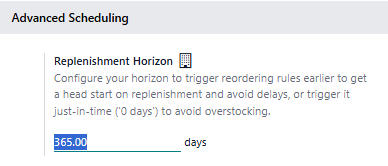
I did that. they are all 180 now but that tool longer than manually setting the 1. I think i will have to wait until we move to 19 which should be soon,
Create an account today to enjoy exclusive features and engage with our awesome community!
Přihlásit se| Related Posts | Odpovědi | Zobrazení | Aktivita | |
|---|---|---|---|---|
|
|
0
dub 26
|
1622 | ||

|
1
lis 25
|
1954 | ||

|
1
dub 25
|
3779 | ||


|
2
dub 25
|
9839 | ||


|
1
srp 22
|
5002 |
1. Use the live chat to ask your questions.
2. The operator answers within a few minutes.

Thanks Ray. I didn't see it as on my system it is not there. I did enable developer mode to see if that helped but it is not there.
I think v19 has the functionality to adjust its default value. Can you use visibility days and set them all to 30?
Hello
It is manage through purely JS logic and not restored back to your input value after refreshing the Browser. So if you want to change this it required small customization
Thanks